Jitterbit MCP (Beta)
Beta
Jitterbit MCP is offered as a beta release. Its features may change before general availability. For beta access and to provide feedback, contact the Jitterbit Product Team.
Overview
Jitterbit MCP (MCP) lets you expose your Harmony integrations and APIs as Model Context Protocol (MCP) capabilities that AI assistants and agents can discover and use.
With MCP, you create governed MCP servers that expose:
-
Tools: Actions that MCP clients can invoke.
-
Resources: Read-only data and contextual information that MCP clients can access.
-
Prompts: Reusable prompt templates and guidance for MCP clients.
MCP provides centralized security, governance, analytics, testing, and lifecycle management across cloud and private deployments. You can reuse the Studio integrations and API Manager custom APIs you already use in Harmony while retaining control over authentication, access, usage, and deployment. The credentials used to reach the underlying integrations and APIs are managed securely and are not exposed to MCP clients.
Jitterbit MCP architecture
The following diagram shows how the Jitterbit MCP components fit together:
Exposes tools, resources, and prompts"] External["External systems
(APIs and integrations)"] Control["MCP control plane"] Clients <-->|"MCP protocol (JSON-RPC)"| Gateway Gateway --> Server Server -.-> External Control <--> Server style Control fill:#eef2f7, stroke:#9fb3c8, stroke-width:2px
Jitterbit MCP consists of four primary components:
-
MCP control plane: Provides centralized configuration, management, and governance. It manages MCP server definitions, tools, resources, prompts, access policies, service tokens, analytics, auditing, and lifecycle operations, along with the configuration for cloud and private MCP deployments.
-
MCP runtime: Hosts MCP servers and makes their tools, resources, and prompts available to authorized MCP clients. It processes capability discovery and requests, and invokes the integrations and APIs behind MCP tools. The MCP runtime can be hosted by Jitterbit or deployed in your own private environment.
-
MCP gateway: Provides the secure entry point for MCP client traffic. It receives requests, applies the configured security and governance controls, and routes each request to the appropriate MCP runtime. The MCP gateway can be hosted by Jitterbit or deployed in your own private environment.
-
MCP server: A managed collection of tools, resources, and prompts exposed to MCP clients through a governed endpoint. You create, configure, publish, and manage MCP servers on the MCP Servers page.
Access Jitterbit MCP
To open Jitterbit MCP, first ensure you meet the Harmony portal's prerequisites and have the required role permissions and environment access. Then log in at https://login.jitterbit.com and click the MCP Servers tile:
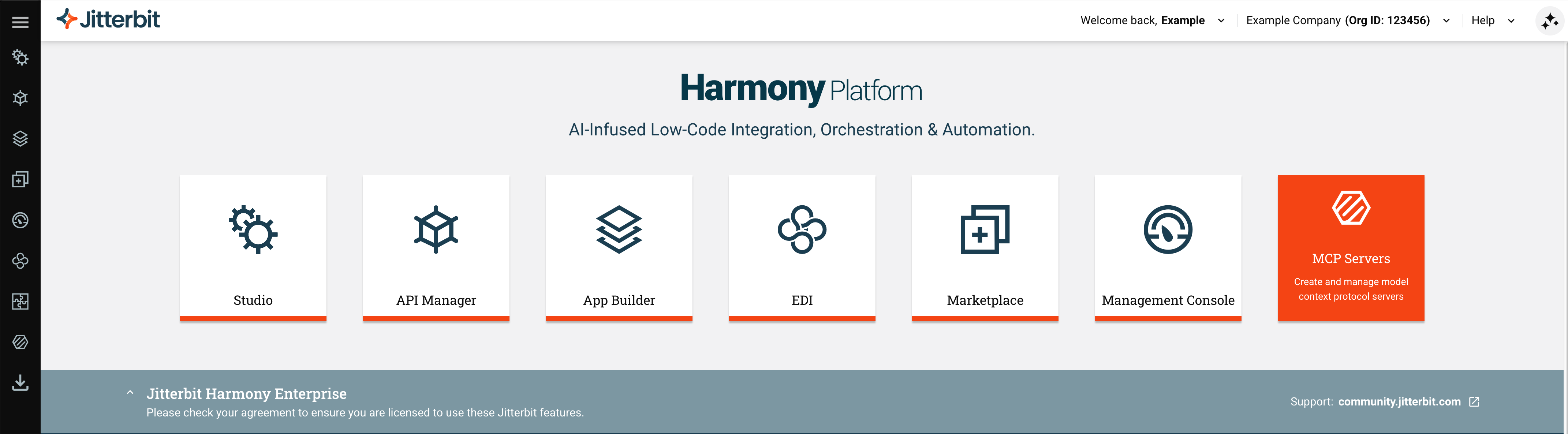
Clicking the tile opens the MCP Servers page. You can also open it, and the other Jitterbit MCP pages, from the Harmony portal menu under MCP:
-
Servers: Create, configure, publish, and manage MCP servers.
-
Logs: Trace MCP request executions and troubleshoot failures.
-
Analytics: Monitor MCP server and tool usage metrics.
-
Service Tokens: Create and manage service tokens for private MCP runtime and MCP gateway deployments.
To connect a Studio operation to an MCP server you've created, see Connect to a Jitterbit MCP server using the MCP Client connector.
For definitions of the components and capabilities used by Jitterbit MCP, see Key concepts.