Observability metrics on the Agents page in Jitterbit Management Console
Overview
| Purpose | Monitor private agents and groups |
| Location | Harmony portal menu > Management Console > Agents > Metrics |
| Page access | A user with Admin role permission can access the page and view all metrics for all agent groups in all environments. |
| A user with Read role permission can access the page and view metrics only for those agent groups associated to environments the user has access to. |
Introduction
The Metrics tab contains a toolbar and two groups of charts plotting various indicators of agent and agent group health:
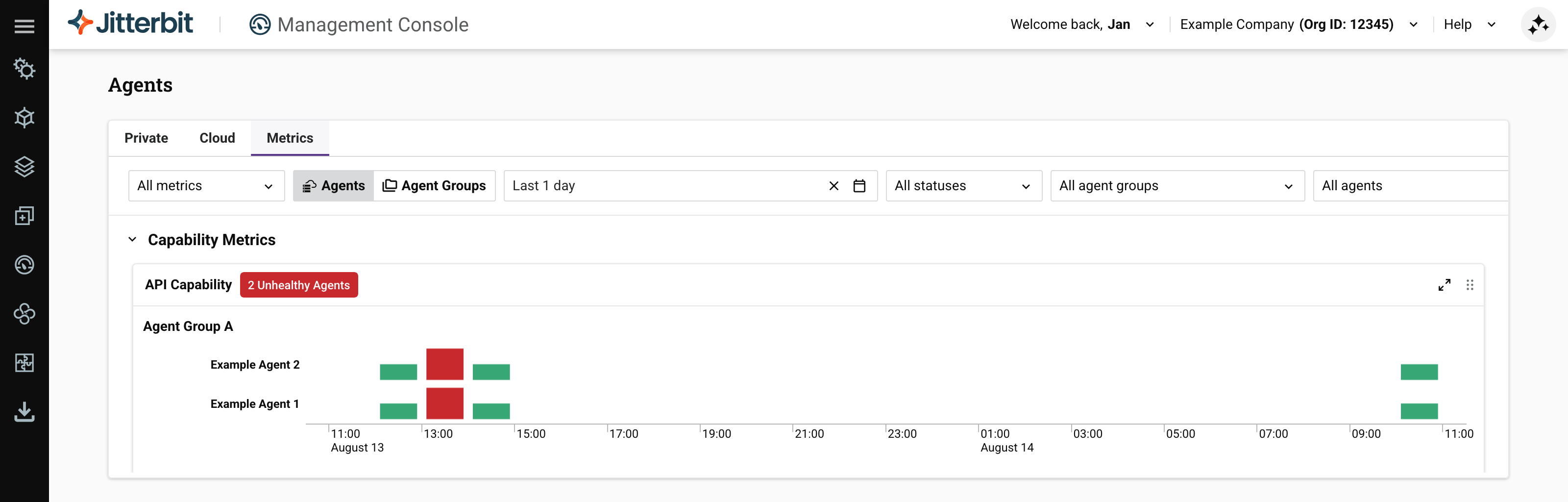
Prerequisites
You must enable native observability on every private agent you want to monitor.
Toolbar
The toolbar has these controls:
-
Metrics selector: Select which metrics charts to show.
-
View selector: Select Agents to view metrics for individual agents, or Agent Groups to view metrics for whole agent groups:
Example chart in Agents view Example chart in Agent Groups view 

-
Date range selector: Select the date range to show metrics for. The default date range is the past 24 hours. To increase the time resolution of charts, either change the date range, or click on a colored segment. Subsequent clicks decrease the range until the limit (1 minute resolution) is reached. Your browser's locale determines how dates are shown.
-
Statuses selector: Select which of the following statuses to show:
-
Healthy: The agent or a member of the group is accepting operations for processing.
-
Degraded: The agent or a member of the group is in an unknown state.
-
Unhealthy: The agent or a member of the group cannot process operations.
-
-
Agent group selector: Select which agent groups to show metrics for.
-
Agent selector: When the view selector is set to Agents, select which agent to show metrics for. (When the view selector is Agent Groups, this control is inactive.)
Observability metrics charts
Charts plot data using the following colors to indicate your private agents' or private agent groups' health:
| Status | Example | Description |
|---|---|---|
| Healthy | 2 Healthy Agents | Agent or agent group is operational and capable. |
| Degraded | 1 Degraded Agent | Agent or agent group has partial or reduced capabilities. |
| Unhealthy | 1 Unhealthy Agent Group | Agent or agent group had critical issues resulting in loss of operational capabilities. |
The meaning of each status varies with the metric, and some metrics can show any status, while others can show only two. The following table shows which metrics can show which statuses, and what the status means:
| Category | Metric | Healthy | Degraded | Unhealthy |
|---|---|---|---|---|
| Capability | API Capability | Capable | Incapable | |
| Overall health | Capable | Incapable | ||
| Run Operation Capability | Capable | Incapable | ||
| System Resource Capability | Capable | Incapable | ||
| Service | Apache | Service is up | Service is down | |
| Cleanup | Service is up | Service is down | ||
| PGBouncer | Service is up | Service is down | ||
| PostgreSQL | Service is up | Service is down | ||
| Process Engine | Service is up | Service is down | ||
| Scheduler | Service is up | Service is down | ||
| Tomcat | Service is up | Service is down | ||
| Verbose Log Shipper | Service is up | Service is down |
For each of the following metrics, the status depends on the percentage of capacity used:
- Healthy: Less than 75% used.
- Degraded: Between 75% and 90% used.
- Unhealthy: More than 90% used.
| Category | Metric |
|---|---|
| Service | Agent Services Client |
| Apache Threads | |
| PostgreSQL Connections | |
| Rest Client | |
| Local Rest Client | |
| Tomcat Threads | |
| Pending Run Operations | |
| Pending Log Sync |
You can expand or move charts with these controls:
-
Expand: Click to expand the chart to fill the window. Click to return the chart to its original size.
-
Move: Click and drag to move the chart to another position.
For some charts, you can switch between bar and line charts using the and icons. Line charts have shaded regions showing the threshold values for each agent health status, Healthy, Degraded, or Unhealthy:
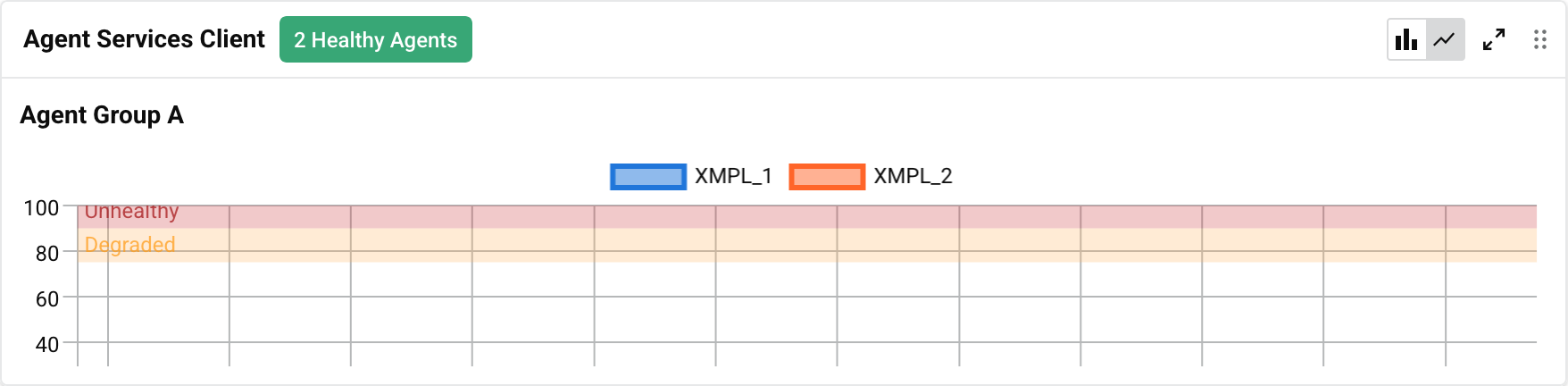
For charts that have them, line charts are the default view when the Management Console Agents page is first loaded.
Capability metrics
| Name | Description | Chart type | X axis | Y axis | Sample |
|---|---|---|---|---|---|
| API Capability | Agent can handle APIs. | Bar | Time | Health |  |
| Overall Health | Agent's overall health capability. | Bar | Time | Health |  |
| Run Operation Capability | Agent's operation execution capability. | Bar | Time | Health |  |
| System Resource Capability | Agent host's resource capability. | Bar | Time | Health |  |
Service metrics
| Name | Description | Chart type | X axis | Y axis | Sample |
|---|---|---|---|---|---|
| Agent Services Client | Status of the agent services. | Bar | Time | Percentage of thread pool used |  |
| Apache | Status of the Apache server. | Bar | Time | Health |  |
| Apache Threads | Apache server thread usage. | Bar | Time | Usage percentage |  |
| Cleanup | Status of the cleanup service. | Bar | Time | Health |  |
| Local Rest Client | Status of the local REST service. | Bar | Time | Percentage of thread pool used |  |
| Pending Log Sync | Status of the pending log synchronization. | Line | Time | Number of logs |  |
| Pending Run Operations | Status of operations pending execution. | Line | Time | Number of operations |  |
| PGBouncer | Status of the PgBouncer connection pooler service. | Bar | Time | Health |  |
| PostgreSQL | Status of the PostgreSQL database server. | Bar | Time | Health |  |
| PostgreSQL Connections | Status of the PostgreSQL database server connections. | Bar | Time | Number of connections |  |
| Process Engine | Status of the process engine. | Bar | Time | Health |  |
| Rest Client | Status of the REST client. | Bar | Time | Percentage of thread pool used |  |
| Scheduler | Status of the scheduler service. | Bar | Time | Health |  |
| Tomcat | Status of the Tomcat application server. | Bar | Time | Health |  |
| Tomcat Threads | Tomcat application server threads usage. | Bar | Time | Number of threads |  |
| Verbose Log Shipper | Status of the verbose log shipper service. | Bar | Time | Health |  |