Operation troubleshooting in Jitterbit Studio
This guide covers errors and unexpected behavior when building, deploying, and running operations in Jitterbit Studio, including operations, transformations, scripts and functions, and design-time validation. If you are troubleshooting a specific connector, see Connector troubleshooting.
For a unified reference covering integration, automation, API management, EDI, and app development issues in one place, see the Harmony troubleshooting guide.
All troubleshooting entries on this page
-
Transformation and data errors
- Unsupported XML elements (CDATA) embedded in JSON
- Transformation fails when a JSON string value exceeds the maximum length
- Special characters in connector-provided JSON schemas
- Multibyte characters are corrupted in a large connector response
- Mirrored schemas with substitution groups
- Importing a transformation mapping with duplicate nodes fails with "node cannot be created"
- Mirrored XML schema reprocessing in projects created before version 10.25
- Extra subelement warning in operation logs
- Transformation output converted to 0 for target fields with a
doubledata type - Blank mapped fields with flat source schemas
- Target loop node mapped to multiple source loop nodes
- Transformation drops duplicate records when output is hierarchical
- Long numeric IDs are corrupted in transformation output
- JSON transformation output omits
nulland empty-string fields - Empty mapped fields become
xsi:nil="true"and invalidate an XML or SOAP request - Byte-order mark (BOM) in a source file is passed through to the first record's value
-
- File functions: Operation continues after
ArchiveFileorReadFilefailure ReadFile: Partial reads with binary file contentReadFilecontent with non-UTF-8 bytes fails when mapped into a UTF-8 XML or JSON payloadFlushFile/FlushAllFiles: Error when target file already existsDeleteFiles: Error when source path cannot be foundGetJSONString: Execution interrupted on invalid path- Script loop iteration limit exceeded
RunOperationstops running after 50 synchronous calls in aWhileloop- Comparing a string to a number gives unexpected results
Unmapdoes not unmap a field when used together withRunScriptDBExecute: Error whenauto_commitandtransactionare bothtrueCallStoredProcedure:resultSetalways null with ODBC driversCallStoredProcedure: "Stored proc or function could not be found" with PostgreSQL JDBCDBLoad: Requires a JDBC database driverAESDecryptionfails with data encrypted under OpenSSL 3- Project variables return empty values during script and transformation tests
- A function fails when its endpoint connection field is set to a variable
IsNullreturns false for empty strings from JSON source data- Comparing a string variable to the number
0unexpectedly returnstrue - Decimal arithmetic produces unexpected floating-point results
- Date functions return midnight instead of a date-only value
- Cached value expires sooner than expected
RunXSLTfails with "XML version must be 1.0 or 1.1"SelectSingleNodereturns the wrong node when used with aSelectNodesarray elementHexToBinaryoutput appears unchanged when loggedSortArraysorts filenames lexicographically, not chronologicallyURLEncodedoes not encode certain "safe" or multibyte characters- JavaScript: "Call to Jitterbit Tomcat failed" error
- JavaScript: Global variable changes lost on script failure
- JavaScript:
GetVarreturns null for user-defined project variables
- File functions: Operation continues after
-
- Common operation validation errors
- HTTP validation rule errors
- Component names must be unique after project import
- Private agent-only connector blocks import to a cloud agent environment
- Uploading a schema file replaces it project-wide
- Marketplace process template deployment fails due to schema mismatch
- Studio becomes slow or unresponsive with very large projects
Diagnostic steps
These steps apply to almost any operation failure and are the recommended starting point before investigating a specific error.
Test the connection
For any operations using connectors, in the connection, click the Test button to ensure the connection is successful.
For connectors deployed in operations running on private agents, clicking Test also ensures the latest version of the connector is downloaded to the agent (unless the Disable Auto Connector Update organization policy is enabled).
Check the operation logs
Check the operation logs for any information written during execution.
Depending on the agent type, additional log data is available:
- Enable operation debug logging (for cloud agents or for private agents).
- Enable connector verbose logging (private agents only).
- Check the agent logs (private agents only).
Isolate agent-specific failures
If an operation fails on some agents but succeeds on others within the same private agent group, use the Run on dedicated agent option to direct the operation to a specific agent. This lets you reproduce and investigate the failure on the problematic agent without taking the rest of the group offline.
To configure this option, open the operation settings, select the Options tab, and configure Run on dedicated agent.
Operation execution and scheduling
Operations stuck in Submitted or Running state
-
Symptom: An operation does not complete as expected. It remains in a Submitted or Running state and never progresses, or is canceled with the message:
Long running operation canceled by SystemThe cancellation can occur after the operation has run for a while or shortly after it starts, and does not necessarily reflect how long the operation actually ran.
-
Possible causes:
- A private agent lost its connection to the Harmony platform and could not report operation status. The platform continues to show the operation as Running and may cancel it as apparently hung, even when the operation completed on the agent. This can affect operations that normally finish in seconds.
- The operation completed, but its final status was not reported back to Harmony, so it continues to appear as Running until it times out.
- The agent group is under heavy load and is slow to pick up or update queued operations.
- The operation is stuck specifically in Submitted: the run message was queued but no agent in the group has accepted it, because the agents are offline, unhealthy, or have no free capacity to accept new operations (for example, every worker thread is occupied).
-
Resolution:
- For private agents, confirm the agent has a Running status on the Agents page in the Management Console, review the private agent logs for connection issues, and verify the network connection between the agent and the Harmony platform is stable.
- Review the operation logs to confirm what happened during the run. The cancellation message can appear even for operations that ran only briefly, so it does not necessarily indicate a genuinely long-running operation. The logs may also reveal a specific error to address, such as a
401 Unauthorized(verify credentials) or a429 Too Many Requests. A429from a target endpoint can be eased by reducing the request rate or adding retry logic; a429from the Jitterbit-managed cloud API gateway is its platform limit of 200 requests per minute, so distribute the calls over time or run the affected APIs on private agents. - Keep private agents on a current version. Later agent versions improve agent resilience and reduce premature cancellation of operations.
- Attempt to cancel the affected operations. Cancellation is available for operations in Submitted, Received, Pending, or Running status from the Management Console Runtime page, the operation log table, or an operation's runtime status on the design canvas.
- If the affected operation runs on a schedule and never starts, see Scheduled operations not executing.
- If the operations cannot be canceled, if the problem recurs, or if many operations are affected at once, contact Jitterbit support, as these cases may require server-side resolution.
Note
The MaxOperationRuntimeSeconds setting in the [ProcessEngine] section of the private agent jitterbit.conf file only limits how long an operation runs after an agent has started executing it, so it has no effect on operations still queued in the Submitted state. The Operation Time Out operation setting limits an operation's total run time, but it cannot be scoped to the Submitted state alone, so lowering it to force a quick cancellation would also cancel operations that are legitimately still running. To clear operations stuck in Submitted, restore agent capacity and health so the queued run messages are picked up, rather than adjusting a timeout.
Scheduled operations not executing
- Symptom: An operation configured with an operation schedule does not run at the scheduled time, or is dispatched but remains in a Pending or Received state.
- Possible causes:
- The schedule was assigned to the operation in Studio but the project has not been deployed. Schedules assigned in Studio do not take effect until the project is deployed.
- The schedule is disabled.
- A time zone misconfiguration exists in the schedule settings.
- For private agents, the scheduling service is not running.
- The agent associated with the environment is offline or unhealthy.
- Changes deployed to a project have not fully synchronized with the agent.
- The agent group is resource-saturated. A backlog of long-running operations or sustained high CPU or memory usage can prevent an agent group from picking up scheduled operations on time.
- Resolution:
- Confirm the project has been deployed since the schedule was assigned to the operation.
- Confirm the schedule is enabled. Schedules can be enabled or disabled only from the Management Console Projects page, on both the Operations and Schedules tabs.
- Review the schedule configuration, paying particular attention to the time zone setting. For details, see Operation time zones.
- For private agents, verify the agent is online and healthy on the Agents page in the Management Console, and confirm the scheduling service is running on the agent machine. On Windows, check that Jitterbit Scheduler and Jitterbit Scheduler Service are running in Task Manager. On Linux and Docker, use the
jitterbit statuscommand. - Re-deploy the project to force the schedule to re-sync with the agent.
- If operations are stuck in a Pending state, cancel them via the Management Console Runtime page and restart the agent service.
- If schedule misses correlate with load, reduce the number of concurrent long-running operations. On private agents, also review CPU and memory usage and balance scheduled operations against the agent's capacity (a private agent can run up to twice its CPU core count in concurrent operations).
- If a scheduled operation is dispatched but then stalls rather than never starting, see Operations stuck in Submitted or Running state.
Dictionary or global variable is empty after an operation runs asynchronously
- Symptom: A dictionary or global variable populated inside a child operation is empty, or keeps its earlier value, when the parent operation reads it after invoking the child asynchronously.
- Possible cause: When an operation is invoked asynchronously (the Invoke Operation tool's Run type set to Asynchronously, or
RunOperationcalled withrunSynchronouslyset tofalse), the child runs on a separate thread and the parent continues without waiting for it. Global variables and dictionaries are passed to the child by value rather than by reference and are not thread-safe, so changes made in the child are not reflected back in the parent. The parent may also read the value before the child finishes. For the equivalent behavior in chunked multi-threaded operations, see Variable updates lost in chunked multi-threaded operations. - Resolution:
- If the parent depends on values the child produces, invoke the child synchronously (the Invoke Operation tool's Run type set to Synchronously, or
RunOperationrun synchronously, which is the default) so the child completes and its global variable changes are inherited by the parent. - To share data across operations that must run independently, persist it with cache functions (
WriteCacheandReadCache) rather than relying on a dictionary or global variable across threads. By default, cache functions are limited to 100 combined calls per minute per organization. - Inserting a fixed delay (for example, with the
Sleepfunction) adds latency and does not guarantee the child has finished; run the operation synchronously instead.
- If the parent depends on values the child produces, invoke the child synchronously (the Invoke Operation tool's Run type set to Synchronously, or
Connection and authentication failures
Salesforce certificate: Subject Alternative Name (SAN) mismatch
-
Symptom: A Salesforce connection to a sandbox or an org with Enhanced Domains enabled fails with:
Certificate for <url> doesn't match any of the subject alternative names -
Possible causes:
- The certificate does not include the Salesforce MyDomain or sandbox URL in its Subject Alternative Names.
- The Sandbox checkbox in the Salesforce connection settings is not correctly toggled.
-
Resolution:
- Inspect the certificate's SAN entries using OpenSSL:
openssl x509 -in cert.crt -text -noout. Confirm the Subject Alternative Name section includes your Salesforce MyDomain URL. - In the Salesforce connection settings in Studio, verify the Sandbox checkbox is correctly set for your target org.
- If the Salesforce URL is absent from the SANs, regenerate the certificate to include the specific domain.
- If the same connection succeeds on a cloud agent group but fails on a private agent, the cause may instead be a missing SNI extension in the agent's TLS handshake. See Salesforce sandbox connection fails with certificate mismatch.
- Inspect the certificate's SAN entries using OpenSSL:
Private agent database connection failure (TranDb)
- Symptom: Operations fail with errors that reference the private agent's internal PostgreSQL database (
TranDb), for exampleFailed to connect to back-end database 'TranDb'orFATAL: query_wait_timeout. - Cause and resolution: This is an agent-level issue with the private agent's internal database connections. See
TranDbconnection failures in the agent troubleshooting guide for the causes and resolution.
Client certificate fails to load on Linux private agents
-
Symptom: An operation that makes an outbound mutual-TLS (client certificate) web service call fails at runtime on a Linux private agent, with an error such as:
Problem with the local SSL certificate. Unable to set private key file: '<path>.key' type PEM.The certificate uploads to Studio successfully, but the operation fails when it runs. The same configuration may have worked previously on a Windows private agent.
-
Possible causes:
- The operating system user that runs the Jitterbit agent does not have read permission for the private key file or its parent directories.
- A Linux security module such as SELinux or AppArmor is blocking the agent's access to the private key file.
-
Resolution:
- Ensure the account that runs the Jitterbit agent has read access to the private key file and all parent directories.
- Check whether SELinux or AppArmor is restricting access to the key file, and adjust the policy or file context accordingly.
Transformation and data errors
Unsupported XML elements (CDATA) embedded in JSON
-
Symptom: Character data (CDATA) sections are not supported in XML embedded within JSON passed through a transformation. When present, the following error appears in the operation log:
Transformation failed. Error: The operation "Operation" failed. Error: Failed to convert XML file to JSON. org.jitterbit.integration.server.engine.EngineSessionException: org.xml.sax.SAXParseException ... -
Resolution: Use a Jitterbit script to
Replacethe&,<,>,', and"characters within the CDATA section, including the CDATA delimiters (<![CDATA[ ... ]]>), with their escaped equivalents (&,<,>,',"). If targeting only the CDATA section is not feasible, the entire XML string containing it can be replaced.The following example is considered invalid without these replacements:
{
  "name": "Jitterbit",
  "data": "<xml><content><![CDATA[<greeting>Hello, world!</greeting>]]></content></xml>"
}
Transformation fails when a JSON string value exceeds the maximum length
-
Symptom: A transformation that processes a large JSON string value fails with an error reporting that the string exceeds the maximum allowed length, for example:
Transformation failed. Error: Error Code: String value length (20054016) exceeds the maximum allowed (20000000, from StreamReadConstraints.getMaxStringLength())The stack trace references
StreamConstraintsExceptionand the agent's JSON parser. A common trigger is an HTTP v2 response with Get response content in base64 string enabled: Base64 encoding inflates binary content (such as an audio or media file), so the encoded string can exceed the limit even when the original file is smaller. -
Cause: The agent's JSON parser limits a single JSON string value to 20 MB (
20000000characters) by default. A response or mapped value larger than this fails while the agent parses it, before any downstream activity (such as an upload) runs. -
Resolution: On a private agent running version 12.5 or later, increase the limit with the
MaxStringLengthkey in the[JsonParser]section of thejitterbit.confconfiguration file (for example, set it to50000000for a 50 MB limit), then restart the agent. This key is available in agent version 12.5 and later, so upgrade the agent first if it is on an earlier version.
Special characters in connector-provided JSON schemas
-
Symptom: When a transformation uses a JSON schema inherited from an adjacent connector activity, any special characters in a schema field or node name are replaced by underscores (
_). When using legacy JSON processing (the default for projects created prior to the 11.48 Harmony release), this can cause the endpoint to return errors because the actual field names no longer match what it expects.For example, if the activity provides a field named
location_ids[], it is converted tolocation_ids__. If the endpoint still expects the original name, it may return an error such as:"error_message": "{location_ids:expected String to be a Array}" -
Resolution:
-
Confirm that a JSON schema is being used in the affected activity. Such schemas have a root node named
json: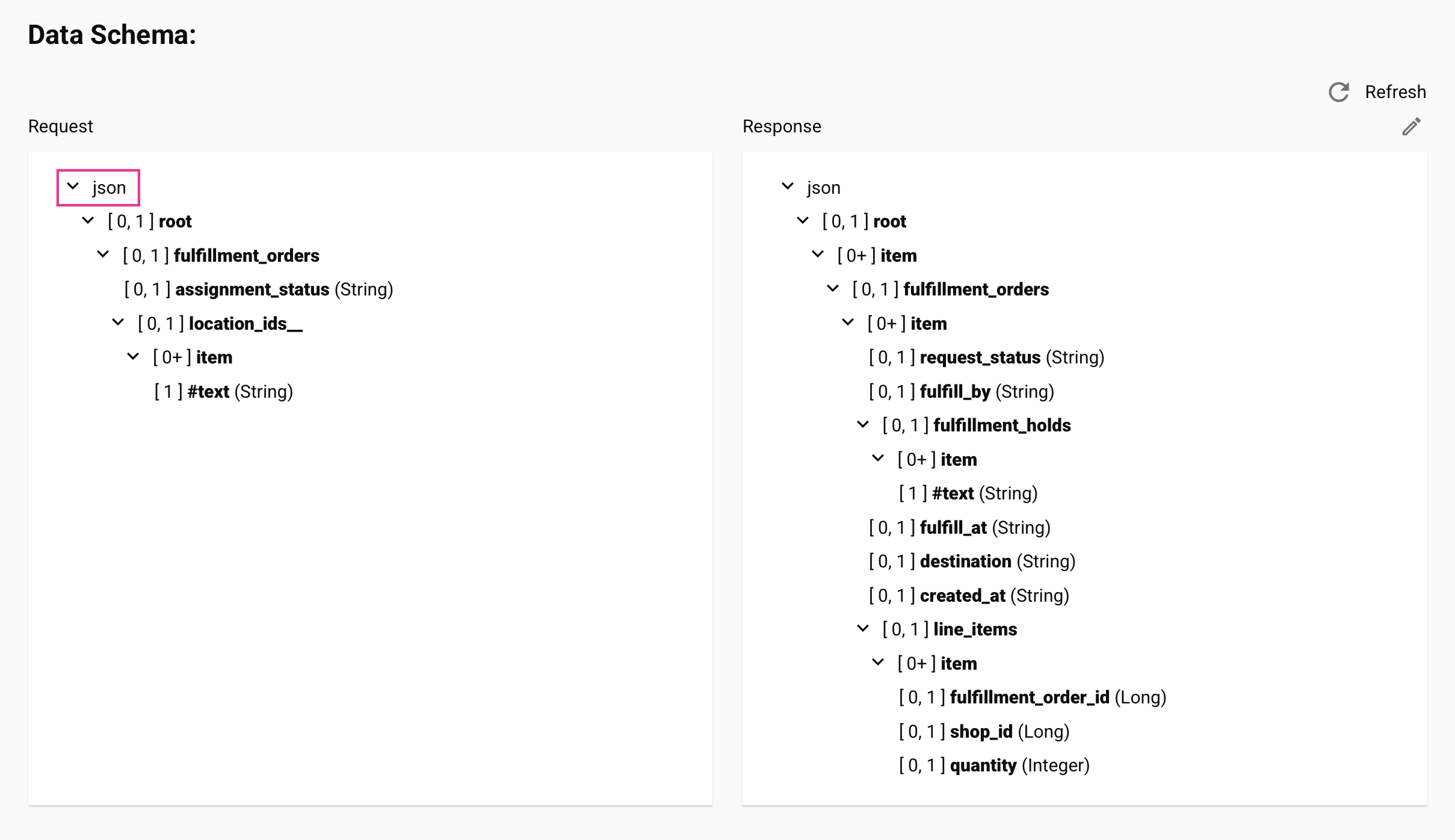
-
Enable the Preserve JSON names project setting (requires agent version 11.48 or later).
- Reconfigure, deploy, and run the operation.
Important
When Preserve JSON names is enabled on a project where it was previously disabled, the new processing method applies only to operations and schemas configured after the setting is enabled. Existing operations and schemas continue using legacy JSON processing. To avoid inconsistencies within a project, reconfigure all existing operations and schemas after enabling this setting.
To verify the field name being sent to the endpoint, check the
jsonPropertyNamevalue in the activity's input or output data with debug logging enabled: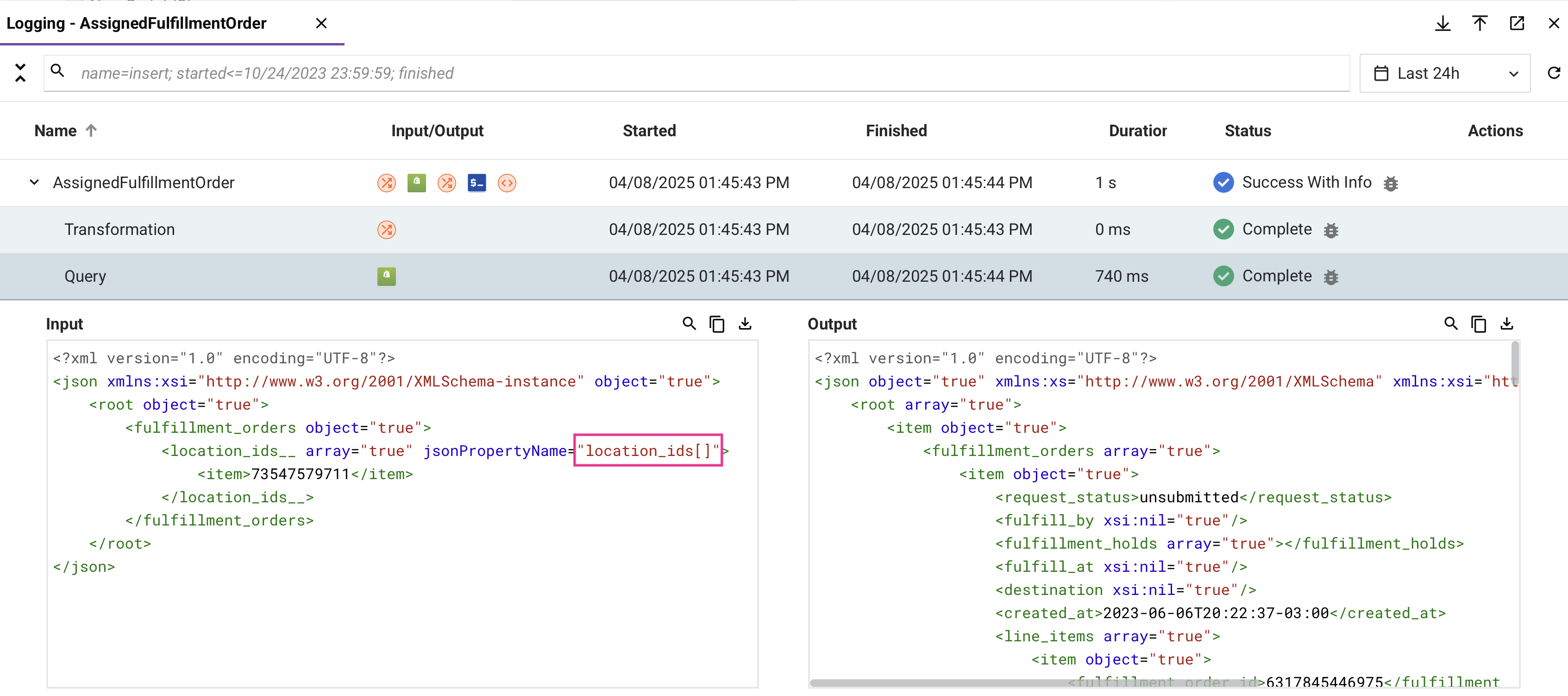
-
Multibyte characters are corrupted in a large connector response
- Symptom: A multibyte character in a JSON connector response is corrupted. The corrupted text shows the classic pattern of UTF-8 bytes decoded as Latin-1 (for example,
São Luísreturned asSão LuÃs). Typically, only a multibyte character that appears after roughly the first 8 KB of the response is affected; the same character appearing earlier in the response is unaffected. - Possible cause: On agent versions 12.8 and 12.9, character-encoding auto-detection samples only the beginning of the response to determine its encoding. If that sample contains only ASCII characters, the response is detected as Latin-1 (ISO-8859-1) instead of UTF-8, corrupting any multibyte character that appears beyond the sampled portion.
- Resolution: Upgrade to agent version 12.10 or later, which corrects the encoding detection.
Mirrored schemas with substitution groups
-
Symptom: Mirrored schemas that use XML substitution groups are not supported. Using one results in a runtime error:
Failed to initialize transformation "<transformation name>". Failed to expand the (source|target) tree for the path: <path to substitution head node>.This error can also occur for other reasons, such as importing a transformation mapping with duplicate nodes, and does not necessarily indicate a substitution group issue.
-
Resolution: If substitution groups are the confirmed cause, clear the mirrored schema and re-create it using a different method (uploading, creating a custom schema, etc.).
Importing a transformation mapping with duplicate nodes fails with "node cannot be created"
-
Symptom: A transformation whose mapping was imported from a file that references duplicate nodes fails at runtime with an error such as:
Failed to initialize transformation "<transformation name>". Failed to expand the target tree for the path: <path to node>. The node: <node name> cannot be created.The mapping can appear correct in the transformation designer even though the operation fails when run.
-
Possible cause: Importing a mapping file that added duplicate nodes to the target schema did not apply the corresponding change to the schema definition used when the operation runs, leaving the two out of sync. This has been fixed, but a transformation whose mapping was imported before the fix can still be affected.
-
Resolution: In the affected transformation, use Remove all mappings beneath this node on the root node to remove all mappings, then import the mapping file again. Reimporting resyncs the schema definition used at runtime with the mapping. If the error persists, reconfigure the activity that provides the schema, then refresh the schema in the transformation.
Mirrored XML schema reprocessing in projects created before version 10.25
-
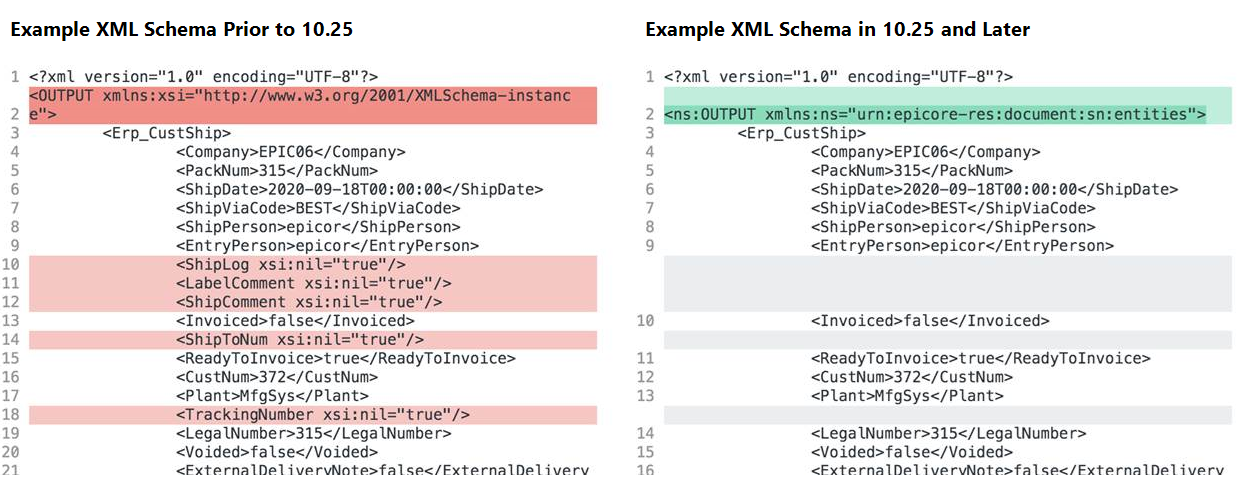
Symptom: Due to changes in Harmony versions 10.25 and 10.27, projects created before 10.25 that use mirrored XML schemas may behave differently than expected. Mappings that used XML functions involving namespaces (such as
SelectNodes) may now be invalid.The difference is in namespace prefix handling:
- Before 10.25: Mirrored XML schemas used the default namespace prefix
xsi. - 10.25 and later: Mirrored XML schemas use the qualified namespace prefix
ns. Unmapped fields are not displayed in the schema.
- Before 10.25: Mirrored XML schemas used the default namespace prefix
-
Resolution: As of version 10.27, importing a project whose mirrored XML schemas were created before 10.25 retains the original namespace prefix, so the schema is identical to when it was created. To force an update to the current namespace prefix, regenerate the schema by refreshing it or reconfiguring the activity that provides it. After regenerating, review all affected XML namespace function calls and update prefix references accordingly.
See the annotated XML schema comparison for an illustration of the difference between the two formats.
Extra subelement warning in operation logs
- Symptom: An
extra subelementmessage in the operation logs is a warning, not an error, and can generally be ignored. It indicates that a connector's API payload returned more nodes or fields than are defined in the response data schema. - Resolution: If you need to capture the additional data, update the schema to include the extra fields.
Transformation output converted to 0 for target fields with a double data type
- Symptom: A target field with a
doubledata type in the schema receives a value of0even though the mapping script returns a non-empty string value. - Possible cause: When the transformation processes a script output, it coerces the result to the target field's data type. If the string value starts with a non-digit character (for example,
"string1"), no numeric portion can be extracted and the field receives the default numeric value of0. By contrast, a value like"1string"would produce1, since the leading digit carries over. - Resolution:
- Check the schema definition for the affected target field and confirm whether its data type is
doubleor another numeric data type. - If the mapping script can return a non-numeric string, add explicit validation to ensure only numeric values are mapped to numeric target fields, or change the field's data type in the schema.
- Check the schema definition for the affected target field and confirm whether its data type is
Blank mapped fields with flat source schemas
- Symptom: Target fields appear blank in the operation output even though the source data contains values. This issue occurs specifically when using a flat source schema. It does not occur with mirrored schemas or JSON schemas.
- Possible cause: The default streaming transformation mode processes records incrementally, which can cause mapped fields to receive no values when used with flat source schemas.
-
Resolution:
-
Add a script step at the start of the operation that disables streaming transformations by setting
jitterbit.transformation.auto_streamingtofalse:$jitterbit.transformation.auto_streaming = false; -
Deploy and rerun the operation. For more context on streaming and transformation processing, see Transformation processing.
-
Target loop node mapped to multiple source loop nodes
-
Symptom: A transformation is invalid or fails to deploy with:
Mappings of a target loop node depend on more than one source loop node. -
Possible cause: A target loop node has field mappings that reference two or more different source loop nodes. Each target loop node can iterate over only a single source loop node.
- Resolution:
- Open the transformation and identify the target loop node flagged in the error.
- Review the mappings under that node to confirm all mapped fields derive from the same source loop node.
- If data from multiple source nodes is needed, pre-process or merge the additional source data in a script step before the transformation, so a single unified source node feeds the target loop.
- For more detail on valid mapping patterns, see Transformation mapping validity.
Transformation drops duplicate records when output is hierarchical
- Symptom: A transformation that reads a CSV source and maps to a hierarchical output format (such as JSON) silently drops duplicate records. Records with identical field values appear only once in the output regardless of how many times they occur in the source. The operation completes successfully but reports fewer target records than source records.
- Possible causes:
- When converting flat source data to a hierarchical output format, the transformation engine removes duplicate records during normalization. Records with identical values after parsing are treated as duplicates and only one copy is kept.
- This behavior is specific to hierarchical output. When the output schema is flat, normalization does not run and all records are written.
- The transformation engine also trims leading and trailing whitespace from CSV field values by default. Records that differ only by leading or trailing spaces become identical after trimming and are subject to the same deduplication.
- Resolution:
- Enable chunking in the operation options. Chunking processes records in batches, which bypasses normalization and preserves all records including duplicates.
- Use a flat output schema in the transformation instead of a hierarchical one. Normalization does not apply to flat output, so all records are preserved.
- Disable normalization by setting a Jitterbit variable in a script step upstream of the transformation. For flat-to-flat transformations, set
jitterbit.transformation.disable_normalizationtotrue. For flat-to-XML transformations, setjitterbit.transformation.flat_to_xml.disable_normalizationtotrue(requires agent 11.58 or later). Both variables can affect other transformations in the same operation, so test the change carefully. - If the duplicates are caused specifically by whitespace differences, set
jitterbit.source.preserve_char_whitespacetotruein a script step upstream of the transformation. This preserves whitespace during parsing so affected records remain distinct.
Long numeric IDs are corrupted in transformation output
- Symptom: A long numeric value (for example, a tracking number, account number, or external ID) is sent to the target with the wrong value. The number is too large to fit in the implicit numeric type used during mapping, so it overflows and produces an incorrect value at the target.
- Possible cause: The source or target field is implicitly typed as a numeric data type whose range cannot hold the full value, causing an overflow during conversion.
- Resolution:
- In the transformation, set the affected target field's data type to String rather than a numeric type. Long IDs that are not used in arithmetic should be treated as strings.
-
If the source field is also typed numerically, cast the value explicitly with
Stringbefore mapping it:String($source.numericId)
JSON transformation output omits null and empty-string fields
- Symptom: A JSON transformation drops fields whose value is
nullor an empty string ("") from the output payload, even though those fields are explicitly mapped. The target system receives a payload that does not include the omitted fields, which can cause downstream validation errors when the target requires the fields to be present. - Possible cause: The JSON output processor omits fields with
nullor empty-string values by default. - Resolution:
- In a script step upstream of the transformation, set
jitterbit.target.xml.include_nil_attributetotrue. On agent version 11.37 or later, this includesnullvalues and empty strings in JSON output, matching the input. (Despite thexmlin its name, this variable applies to JSON targets.) - If you need full control over which fields appear in the payload, build the JSON body in a script step using string concatenation and send it through an HTTP v2 connector with a no-schema request body.
- In a script step upstream of the transformation, set
Empty mapped fields become xsi:nil="true" and invalidate an XML or SOAP request
-
Symptom: In an XML or SOAP transformation, a mapped field with an empty value is emitted as a nil element, and the target endpoint rejects the request. For example, an empty phone-number mapping produces:
<ns1:Phone_Number xsi:nil="true"/>Some endpoints (for example, Workday SOAP services) treat this as invalid and return an error.
-
Cause: By default, when a mapping to a target node results in a null or empty value, the transformation includes the node but marks it nil (
xsi:nil="true"). This is controlled byjitterbit.target.xml.include_null_xml, whose default istrue. -
Resolution: In a script step upstream of the transformation, set
$jitterbit.target.xml.include_null_xml = falseto remove nodes with a null or empty value from the output entirely. If instead the node must be present as an empty element, use the related target Jitterbit variablesjitterbit.target.xml.include_empty_xmlandjitterbit.target.xml.include_nil_attribute, which control whether empty and null values are included in the output.
Byte-order mark (BOM) in a source file is passed through to the first record's value
- Symptom: When a source file (for example, a CSV file) begins with a UTF-8 byte-order mark (BOM), the first field of the first record in the transformation output contains an extra or unexpected character that isn't part of the source data, rather than the expected value. Files exported as UTF-8 CSV from Microsoft Excel commonly include this BOM.
- Possible cause: Studio reads a source file's content as-is and does not detect or strip a leading BOM. The BOM's raw bytes become part of the first field's value once the file is parsed into records.
- Resolution: Inspect the affected field's value to identify the exact characters produced by the BOM, then map the field using
Replaceto remove them. On agent version 12.6 or earlier, where UTF-8 isn't the default, you can also explicitly set the character encoding to UTF-8 before the source activity runs, for example$jitterbit.source.text.character_encoding = "utf-8";. Agent version 12.7 and later use UTF-8 by default.
Script and function errors
File functions: Operation continues after ArchiveFile or ReadFile failure
- Symptom: An operation completes with a success status, but files were not archived or data was not read as expected. No error appears in the operation result, only a warning in the operation log.
- Possible cause:
ArchiveFileandReadFilehave soft failure behavior: if either function fails, the current script aborts and a warning is added to the operation log, but the operation itself does not fail and subsequent steps continue. As of agent version 12.5, one case is an exception:ArchiveFilecalled withdeleteSourceset totruethrows a catchable error when the source file cannot be deleted, instead of failing silently. - Resolution:
- Check the operation logs for warning messages when an operation succeeds but expected file output is missing.
- If the script must stop on a file function failure, wrap the call in an
Evalfunction and callRaiseErrorexplicitly to promote the warning to an operation failure.
ReadFile: Partial reads with binary file content
- Symptom: A script using
ReadFileto read a binary file (such as a ZIP or PDF) returns incomplete or corrupted data. - Possible cause:
ReadFileis not reliable with binary file content and typically reads only a portion of such files. - Resolution: Use
Base64EncodeFileinstead ofReadFileto read the complete contents of a binary file as a Base64-encoded string.
ReadFile content with non-UTF-8 bytes fails when mapped into a UTF-8 XML or JSON payload
-
Symptom: A transformation that maps raw file content read with
ReadFile(for example, a raw EDI file) into a UTF-8 XML or JSON target field fails during the XML or JSON conversion. Replacing the mapped value with a hardcoded string lets the operation complete, which confirms the raw content is the trigger. Attempts to strip the offending character using its Unicode code point (for example,Replace($readFile, HexToString("2026"), "~")for the ellipsisU+2026) do not match, and callingStringToHexon the content with Unicode support enabled throws:not a UTF-8 string, byte not in range: 13 -
Cause: The file content contains a byte that is not valid UTF-8 (for example, the single byte
0x85, which some EDI files use as a segment terminator). This raw byte is not the same as the multi-byte UTF-8 encoding of a similar-looking Unicode character (the ellipsisU+2026encodes as three bytes), so a replacement targeting the Unicode code point never matches. Withjitterbit.scripting.hex.enable_unicode_supportset totrue, the hex functions interpret the content as UTF-8 and fail on the invalid byte. -
Resolution: Match and replace the raw byte with Unicode hex support disabled, so
HexToStringoperates on raw bytes rather than UTF-8 characters:$jitterbit.scripting.hex.enable_unicode_support = false; $badByte = HexToString("85"); $readFile = Replace($readFile, $badByte, "~");Adjust the hex value (
85) to the byte reported byStringToHex($readFile), and the replacement string (~) as needed, then map the sanitized value.
FlushFile / FlushAllFiles: Error when target file already exists
- Symptom: A script fails when attempting to write a file to a target that already contains a file with the same name.
- Possible cause:
FlushFileandFlushAllFiles(and by extensionArchiveFile) throw an error if a file with the target name already exists at the destination. - Resolution:
- Add a
DeleteFileorDeleteFilescall before the write operation to remove the existing file. - Alternatively, use a dynamic filename that includes a timestamp or unique identifier to avoid collisions.
- Add a
DeleteFiles: Error when source path cannot be found
- Symptom: A script using
DeleteFilesfails with an error when the specified source path or directory cannot be found. (A filter that matches no files returns0rather than an error.) - Possible cause: If the source path cannot be found,
DeleteFilesthrows an error rather than returning silently. This can cause unexpected operation failures when the file to be deleted does not exist. - Resolution: Wrap the
DeleteFilescall in anEvalfunction to catch the error and handle it without failing the operation.
GetJSONString: Execution interrupted on invalid path
- Symptom: A script calling
GetJSONStringfails when the supplied path does not resolve in the JSON (for example, the node is absent or an array is empty). The error is generic and does not identify the path as the cause; when the operation is invoked through an API, it can surface as a misleadingProxy Error [502]returned to the API caller. - Possible cause: If the
pathargument passed toGetJSONStringis invalid or matches no data, the function interrupts execution flow immediately and returns an error, which can cause the entire script to abort. - Resolution:
- Validate the JSON path before passing it to
GetJSONString, or (on agent version 11.59 / 12.3 or later) useGetJSONStringEx, which returns a customizable value instead of interrupting execution when the path is invalid or not found. - Log the JSON payload immediately before the
GetJSONStringcall to verify the actual structure and confirm the path.
- Validate the JSON path before passing it to
Script loop iteration limit exceeded
- Symptom: A script fails with an error indicating the maximum number of loop iterations has been reached. The default limit is 50,000 iterations.
- Possible causes:
- A loop in a Jitterbit script exceeds the platform's iteration limit.
- A JavaScript script contains multiple loops whose combined iteration counts exceed 50,000. In JavaScript, the limit applies per script (across all loops), not per individual loop.
- Resolution:
- Review the script logic to determine whether the loop can be optimized to reduce the number of iterations.
- For JavaScript scripts on private agents, the per-script limit can be increased by adding
JavaScriptMaxIterations=X(whereXis greater than50000) to the[Settings]section of the private agent configuration file. - For Jitterbit Script on private agents, increase the limit by setting
jitterbit.scripting.while.max_iterationsto a value greater than50000.
RunOperation stops running after 50 synchronous calls in a While loop
-
Symptom: Starting with the 12.11 release, a script that calls
RunOperation,RunOperationFromProject, orReRunOperationsynchronously from within aWhileloop processes fewer records than expected. When the limit is reached, the operation log records a message that begins:Maximum number of synchronous RunOperation() calls from within a While() loop has been exceeded. The currently configured maximum is 50.No operation-level error occurs unless the script itself checks the function's return value or calls
GetLastError. The message identifies the invoked operation by name (falling back to its GUID if the name cannot be resolved), andGetLastErrorreturns this same identifying information. -
Possible cause: Starting in agent version 12.11, an agent-level limit (
MaxSynchronousRunOperationCallsInLoopin thejitterbit.conffile's[OperationEngine]section,50by default) caps the number of synchronousRunOperation,RunOperationFromProject, andReRunOperationcalls made from within a singleWhileloop; all three share one cumulative count per loop. Once the limit is reached, each further call returnsfalsewithout raising an error, so a loop that does not check the return value continues iterating without noticing that later calls did nothing. -
Resolution:
- If the loop does not already check the return value, wrap the call so a limit trip surfaces as a script error, for example:
If(!RunOperation("<TAG>operation:MyOp</TAG>"), RaiseError(GetLastError()));. - To raise the limit for a specific operation, set the
jitterbit.operation.max_sync_runop_calls_in_loopJitterbit variable before the loop runs, provided per-operation overrides are allowed (MaxSynchronousRunOperationCallsInLoopOverrideAllowed). - To raise the agent-wide default, increase
MaxSynchronousRunOperationCallsInLoopin thejitterbit.conffile's[OperationEngine]section.
- If the loop does not already check the return value, wrap the call so a limit trip surfaces as a script error, for example:
Comparing a string to a number gives unexpected results
-
Symptom: A comparison between a string and a number returns an unexpected result. For example, comparing a non-numeric string to
0evaluates as equal, so the wrong branch runs:$value = "test"; If($value == 0, WriteToOperationLog("equal"), WriteToOperationLog("not equal")); // logs "equal", even though "test" is not 0 -
Cause: When the two operands are different types, Jitterbit Script converts both to numbers to compare them. A string that does not represent a number converts to
0, so"test" == 0becomes0 == 0, which istrue. This is expected behavior. -
Resolution: Compare values of the same type. To test a string against a specific value, compare it to a string literal (for example,
$value == "0"or$value == "") rather than a number. If a value can arrive as either type, convert both operands to the same type (for example, withString) before comparing.
Unmap does not unmap a field when used together with RunScript
-
Symptom: A target field's mapping expression involves both
RunScriptandUnmap, but the field is not unmapped. For a JSON or XML target, the field appears in the output with anullvalue instead of being omitted. -
Possible causes:
RunScriptprecedesUnmapin the same mapping expression (for example,RunScript("<TAG>script:MyScript</TAG>"); Unmap();). On agent versions earlier than 12.9, this combination did not unmap the field.Unmapis called from inside the script invoked byRunScript, rather than directly in the target field's own mapping expression.RunScriptreturns the called script's result as a string rather than propagating an unmap signal back to the mapping, so callingUnmapfrom inside the called script has no effect, on any agent version, regardless of any conditional logic around the call. This is expected behavior.
-
Resolution:
- If
RunScriptandUnmapare both called directly in the target field's mapping expression, upgrade to agent version 12.9 or later. -
If
Unmapis called from inside the script invoked byRunScript, move theUnmapcall out of the called script and into the target field's own mapping expression instead, for example:RunScript("<TAG>script:MyScript</TAG>"); If(<condition>, Unmap(), <value>);
- If
DBExecute: Error when auto_commit and transaction are both true
- Symptom: An operation using
DBExecutefails with an error related to conflicting transaction settings. - Possible cause: Both
jitterbit.scripting.db.auto_commitandjitterbit.scripting.db.transactionare set totruein the script before theDBExecutecall. These two settings are mutually exclusive and combining them causes an error. - Resolution: Decide whether you need auto-commit behavior or explicit transaction control, then set only the appropriate variable:
- For auto-commit (each statement committed immediately): set
$jitterbit.scripting.db.auto_commit = trueand leavejitterbit.scripting.db.transactionunset orfalse. - For transaction control (commit at end of transformation): set
$jitterbit.scripting.db.transaction = trueandjitterbit.scripting.db.auto_commit = false.
- For auto-commit (each statement committed immediately): set
CallStoredProcedure: resultSet always null with ODBC drivers
- Symptom: A script using
CallStoredProcedurereturnsnullfor theresultSetparameter even though the stored procedure returns data. - Possible cause: The
resultSetparameter is only supported by JDBC database drivers. When the Database endpoint uses an ODBC driver,resultSetis alwaysnullregardless of what the stored procedure returns. - Resolution:
- If the stored procedure result set is required, switch the Database endpoint to use a JDBC driver instead of ODBC.
- If switching drivers is not possible, retrieve output data via output parameters rather than the
resultSetargument.
CallStoredProcedure: "Stored proc or function could not be found" with PostgreSQL JDBC
-
Symptom: A script using
CallStoredProcedureagainst a PostgreSQL database fails with:CallStoredProcedure failed to execute call "<function-name>". java.sql.SQLException: Stored proc or function could not be found: <function-name> -
Possible cause: The PostgreSQL JDBC driver distinguishes between functions and procedures.
CallStoredProcedurealways builds its call using a pattern the driver interprets as a search for a procedure. If the database object is a PostgreSQL function rather than a procedure, the driver cannot locate it and returns the "not found" error. - Resolution:
- Determine whether the database object being called is a PostgreSQL function (returns a value) or a procedure (no return value).
-
Replace
CallStoredProcedurewithDBExecuteand use the correct SQL syntax for the object type:-
Function: use
SELECT.$result = DBExecute("<TAG>Sources/My DB Connection</TAG>", "SELECT my_function(arg1, arg2)");DBExecutereturns a result set. Use aWhileloop withGetto read the returned values. -
Procedure: use
CALL.DBExecute("<TAG>Sources/My DB Connection</TAG>", "CALL my_procedure(arg1, arg2)");PostgreSQL procedures do not return a value; the return value of
DBExecutecan be discarded.
-
DBLoad: Requires a JDBC database driver
- Symptom: An operation using
DBLoadfails or produces no output when the Database endpoint uses an ODBC driver. - Possible cause:
DBLoadonly works with Database endpoints configured to use a JDBC driver. It is not supported with ODBC drivers. - Resolution: Confirm the Database endpoint associated with the target activity uses a JDBC driver. If it uses an ODBC driver, switch to JDBC.
AESDecryption fails with data encrypted under OpenSSL 3
- Symptom: An operation using
AESDecryptionfails or returns garbled output when decrypting data that was encrypted using OpenSSL 3. - Possible cause:
AESDecryptionuses a legacy AES algorithm by default that is not compatible with OpenSSL 3 encryption. When the encrypted data was produced with OpenSSL 3, decryption fails without additional configuration. - Resolution:
- For private agents version 11.42 or later, set
jitterbit.scripting.aes.defaulttotruein a script step upstream of theAESDecryptioncall to enable OpenSSL 3 compatibility. - Alternatively, replace
AESDecryptionwithAESDecryptionEx, which supports OpenSSL 3 by default on agent versions 11.42 or later.
- For private agents version 11.42 or later, set
Project variables return empty values during script and transformation tests
- Symptom: When testing a script step or transformation in Studio, a project variable referenced in the script or mapping returns an empty value instead of the configured value. The test may fail with an error unrelated to the variable itself (for example, a connection timeout caused by a blank server address).
- Possible cause: Project variable values are injected at runtime by the Harmony platform. During a design-time test, no runtime context exists to inject that value, so a project variable reference returns an empty value unless the variable has a Default value configured to use as a fallback. A function's own connection resolution is a separate case that does not use the Default value at all; see A function fails when its endpoint connection field is set to a variable.
- Resolution:
- Set a default value on the project variable: In the project variable configuration, enter the value to use during testing in the Default value field. This is the simplest fix for a static configured value. Note that the default is used whenever the variable has not been set at runtime (not only during design-time tests), so at runtime it also acts as a fallback when the variable is otherwise unset. See Project variables for configuration details.
- Use a global variable: Replace the project variable reference with a global variable and assign its value within the script itself, before the line that uses it. Because a global variable obtains its value from script execution rather than runtime injection, assigning it before use makes it available during a design-time test. Prefer this when the value is derived in a script, or when you do not want a runtime fallback value. See Global variables for details. If the global variable is referenced in a connector configuration field rather than directly in a script, you must also define a per-field default value for that field (see Define a default value, which covers both the variable-pill method and the inline-syntax method for fields that don't show a pill).
A function fails when its endpoint connection field is set to a variable
-
Symptom: Testing a script (using Run test) that calls a function such as
DBLookup,DBExecute, orSfLookupfails, for example with:No suitable driver found for [...]or an error indicating an unresolved variable placeholder in the endpoint address. The same script runs successfully when deployed and executed in an operation.
-
Possible cause: The connection used by the function has a field (such as Login, Password, Connection String, or a server address) set to a global or project variable. Testing a script runs only the tested script, so the variable has not yet been assigned its runtime value when the function resolves the connection. Unlike a variable referenced in an activity's own configured field, this is not covered by a variable's Default value; a function like these does not read the default value when resolving a connection. For a variable referenced directly in a script or mapping instead, where a Default value does resolve the issue, see Project variables return empty values during script and transformation tests.
-
Resolution: Before the function call, temporarily assign the same global or project variable its actual value directly within the tested script (for example,
$login = "value";for a variable namedlogin), then remove the assignment before deploying the operation.
IsNull returns false for empty strings from JSON source data
- Symptom:
IsNullreturnsfalsefor a field mapped from a JSON source, even when the field appears to have no value. Downstream logic that depends on the null check behaves unexpectedly or produces incorrect results. - Possible cause: JSON distinguishes between an absent or explicit
nullvalue and an empty string (""). A field set to""in JSON is an empty string, not null, soIsNullcorrectly returnsfalsefor it. Starting with agent 11.37, the agent preserves this distinction accurately. Scripts or transformations that previously relied onIsNullreturningtruefor empty strings depended on earlier behavior that is no longer correct. -
Resolution:
-
Use
IfEmptyto handle both null and empty strings: TheIfEmptyfunction returns a default value when the argument is null or an empty string, and is the recommended replacement for this scenario:// Returns "default" if the field is null or an empty string result = IfEmpty($myField, "default"); -
Use
Lengthto test for empty strings explicitly: If you only need to check whether a string is empty (not null), useLength($myField) == 0. - Fix the source data: If the JSON source should indicate no value, update it to send
"field": nullor omit the field entirely rather than"field": "".
-
Comparing a string variable to the number 0 unexpectedly returns true
- Symptom: A comparison such as
$myVar == 0returnstrueeven when$myVarholds a non-numeric string (for example,"test").Ifconditions and other logic that checks for zero produce unexpected results. - Possible cause: When Jitterbit Script compares values of different data types, it attempts to convert both operands to doubles as a final step. When applied to a non-numeric string, the conversion fails and returns
0as the default value. The comparison then evaluates as0 == 0, which istrue. -
Resolution:
-
Ensure both sides of the comparison use the same data type. If the intent is to check whether a string variable holds the value
"0", compare against the string literal"0"rather than the integer0:// Compares string to integer: non-numeric strings coerce to 0 and match unexpectedly If($myVar == 0, ...) // Compares string to string: behaves as expected If($myVar == "0", ...) -
If the variable is expected to hold a numeric value, ensure it is assigned as a number rather than a string before the comparison.
-
Decimal arithmetic produces unexpected floating-point results
- Symptom: An arithmetic expression involving decimal literals produces a result that is very slightly off from the expected value. For example,
Double(12.01) - Double(12.00)returns0.00999999999999979instead of0.01, and(4.9 * 100) - 490evaluates to5.6843418860808e-14instead of0. - Possible cause: Jitterbit Script stores numbers as floating-point values. Most decimal fractions cannot be represented exactly in binary floating point, so arithmetic on them can accumulate small rounding errors. Subtraction that cancels most of a value exposes this residual. Explicitly casting values as
Doubledoes not prevent this: it specifies the data type but does not change how the value is stored or computed. -
Resolution:
-
Apply
Roundto the result: UseRoundwith the number of decimal places required for the calculation:$a = Round(Double(12.01) - Double(12.00), 2); // returns 0.01 -
Cast decimal literals using
Float: Wrap the decimal literal inFloatbefore the calculation:$a = (Float(4.9) * 100) - 490; WriteToOperationLog($a);
-
Date functions return midnight instead of a date-only value
- Symptom: After upgrading to agent version 12.8 or later,
ConvertTimeZone,Date, orGeneralDatereturns a full date and time string (for example,2026-01-01 00:00:00) for an input of exactly midnight, instead of a date-only string (2026-01-01), which can break downstream logic that expects the shorter format.CVTDateis not affected. - Possible cause: With agents version 12.8 and later, these functions treat midnight (
00:00:00) as a valid time value and preserve it in the returned value, the same way as any other time. Previously, a value of exactly midnight was truncated to a date-only string, while any other time was preserved correctly. - Resolution: If downstream logic requires a date-only value, use
FormatDateto explicitly format the result rather than relying on the function's default output format.
Cached value expires sooner than expected
- Symptom: A value written to the cache with a long expiration (for example, 24 hours) disappears well before that time elapses, or expires after 30 minutes regardless of what was set in
WriteCache. - Possible cause: Each call to
ReadCacheresets the expiration of the cached item to 30 minutes (1800 seconds) unless theexpirationSecondsparameter is explicitly provided. TheWriteCacheexpiration only applies at the time of the write; subsequent reads without an explicit expiration silently shorten the remaining lifetime. -
Resolution:
-
Specify the expiration in
ReadCache: Pass the desired number of seconds as theexpirationSecondsparameter to preserve or extend the cached value's lifetime on each read:// Resets expiration to 24 hours on each read testVal = ReadCache("CacheTest", 86400, "env"); -
Pass
-1to preserve the write expiration: Passing a non-positive value causesReadCacheto retain the expiration set by the most recentWriteCachecall rather than applying a new one:testVal = ReadCache("CacheTest", -1, "env");
-
RunXSLT fails with "XML version must be 1.0 or 1.1"
-
Symptom:
RunXSLTfails with the error:Failed to execute xslt. XML version must be 1.0 or 1.1even though the input XML file contains a valid
<?xml version="1.0"?>declaration. -
Possible cause: The XSLT stylesheet is configured to produce HTML output (for example,
<xsl:output method="html"/>).RunXSLTonly supports XML as output. When the stylesheet produces HTML, the function generates an empty result, which triggers this error. The error message refers to the missing XML declaration on the (empty) output, not the input XML. -
Resolution:
-
Update the XSLT to produce XML output: Change the stylesheet's output declaration to
<xsl:output method="xml"/>, or remove thexsl:outputdeclaration entirely (XML is the default). This is the recommended approach and works on both cloud and private agents. -
Use the XSL Transform plugin (private agents only): For private agent groups, the deprecated XSL Transform plugin uses the Saxon XSLT processor and supports non-XML output formats including HTML. See Plugins available for installation details.
-
SelectSingleNode returns the wrong node when used with a SelectNodes array element
- Symptom:
SelectSingleNodereturns data from the wrong element (for example, always the first match in the document) when called on an element retrieved from aSelectNodesarray. - Possible cause: Using an absolute XPath expression (one starting with
//) as the path argument causesSelectSingleNodeto search from the root of the original XML document rather than relative to the current node. An expression like"//Item/ItemName"matches the firstItemNameanywhere in the document, regardless of whichItemelement was retrieved from the array. -
Resolution:
-
Use a relative path: Omit the leading
//and specify only the element name or a path relative to the current node. This scopes the search to the node passed as the first argument:$itemName = SelectSingleNode($item, "ItemName"); -
Alternative: wrap the node in
String: Converting the array element to a string before passing it toSelectSingleNodealso produces the correct result, though using a relative path is the preferred approach:$item = String($items[2]); $itemName = SelectSingleNode($item, "//Item/ItemName");
-
HexToBinary output appears unchanged when logged
- Symptom:
HexToBinaryappears to have no effect: the value written to the operation log looks identical to the hex input, suggesting the conversion did not occur. - Possible cause:
WriteToOperationLogcannot output raw binary data. When passed a binary value, it converts it back to hexadecimal for display. The same behavior applies in the script test window. The conversion is working correctly; only the display is affected. -
Resolution: To work with or verify the binary output, write it to a file using
WriteFile. For example:WriteFile("<TAG>activity:ftp/FTP Endpoint/ftp_write/Write</TAG>", HexToBinary("1A3F"));
SortArray sorts filenames lexicographically, not chronologically
- Symptom:
SortArrayreturns filenames in alphabetical order rather than the expected chronological order when filenames contain embedded date or time strings. - Possible cause:
SortArrayperforms a string (lexicographical) sort. For a filename likeordall_DDMMYYHHMMSS.txt, the day part precedes the year part in the string, so an alphabetical sort does not match a date-based sort. - Resolution:
- If you control the filename convention, switch to a format that sorts correctly when sorted alphabetically, such as
YYYY-MM-DD_HHMMSS_filename.txt. This is the simplest and most reliable fix. - If the filename format cannot change, parse the date portion of each filename into a sortable key (for example,
YYYYMMDDHHMMSS) and sort against the parsed key rather than the raw filename.
- If you control the filename convention, switch to a format that sorts correctly when sorted alphabetically, such as
URLEncode does not encode certain "safe" or multibyte characters
- Symptom: A value passed through
URLEncodeis sent to the target with some characters left unencoded, causing the receiving system to reject the request or misinterpret the value. This commonly affects credentials or query values that contain characters such as$,+, or!. - Possible causes:
URLEncodefollows RFC 1738 and treats these characters as "safe", so it never encodes them:$ - _ . + ! * ' ( ) ,. A target that expects these characters to be percent-encoded receives the raw character instead.- Multibyte character support in
URLEncoderequires agent version 12.4 or later. On earlier agents, multibyte characters may not encode as expected.
-
Resolution:
-
When "safe" characters must be encoded (for example, in an OAuth password or a value that contains
+), use the JavaScriptencodeURIComponentfunction in a JavaScript script step instead ofURLEncode:<javascript> $my_username = "$Example+User"; $loginValue = encodeURIComponent($my_username); </javascript>This returns
%24Example%2BUser. -
To encode multibyte characters with
URLEncode, confirm the agent is on version 12.4 or later.
-
JavaScript: "Call to Jitterbit Tomcat failed" error
-
Symptom: A complex or long-running JavaScript step fails with a generic error referencing Tomcat, even though both the Jitterbit Apache and Jitterbit Tomcat services on the agent are running. The script may succeed when its complexity is reduced (for example, by lowering iteration counts or recursion depth).
Call to Jitterbit Tomcat failed (null response). Make sure the Jitterbit Apache and Jitterbit Tomcat services are both running. Failed to execute script -
Possible cause: Deeply recursive JavaScript can exceed the recursion-depth limit of the agent's JavaScript engine, producing a stack overflow that surfaces as this generic Tomcat error. This recursion limit is intentional. The script typically completes once the recursion depth is reduced.
- Resolution:
- Reduce the recursion depth, or rewrite the recursive logic as an iterative loop.
- If the algorithm cannot avoid deep recursion, use an approach that does not rely on it.
- Note that the separate per-script loop iteration limit (
JavaScriptMaxIterations, see Script loop iteration limit exceeded) does not raise the recursion ceiling, which is not exposed as a configurable setting.
JavaScript: Global variable changes lost on script failure
- Symptom: A JavaScript script that modifies global variables runs without apparent error in some cases, but changes to those global variables are absent in subsequent scripts or operations.
- Possible causes:
- In JavaScript, changes to global variables are only committed when the script completes successfully. If the script fails at any point, all global variable changes made during that execution are discarded.
- Mixing
$variablesyntax withJitterbit.SetVar/Jitterbit.GetVarfor the same variable within a JavaScript script can cause unpredictable runtime behavior.
- Resolution:
- Structure JavaScript scripts so all global variable assignments occur after logic that might fail, or use error handling to prevent mid-script failures.
- For any given variable in a JavaScript script, use either
$variablesyntax orJitterbit.SetVar/Jitterbit.GetVar, never both. Choose one and use it consistently throughout the script. - To confirm which variables are being set, add
WriteToOperationLogcalls to log variable values at key points during execution.
JavaScript: GetVar returns null for user-defined project variables
- Symptom: Calling
Jitterbit.GetVaron a user-defined project variable in a JavaScript script step returnsnullinstead of the variable's value, with no error message. - Possible cause:
Jitterbit.GetVarandJitterbit.SetVarare intended for Jitterbit system variables (for example,jitterbit.operation.name) and for variable names that contain a period, which JavaScript's dot notation cannot reference directly. They do not read ordinary user-defined project variables whose names contain no period; passing such a name toGetVarreturnsnull. Reference those variables directly with$nameinstead. These functions also convert all values to strings, so they are not suitable for arrays or objects, and a value set withSetVarcan be read back withGetVarwithin that same script, but does not persist to later scripts. -
Resolution: Use the
$variableNamesyntax directly in JavaScript to access user-defined project and global variables whose names do not contain a period. ReserveGetVarandSetVarfor Jitterbit system variables and for variables whose names contain a period (for example,$hello.world), which JavaScript's dot notation cannot access directly. For a given variable, use either$-prefixing orGetVar/SetVar, not both. See also JavaScript: Global variable changes lost on script failure.// Correct: access a user-defined project variable directly var value = $myProjectVar; // Incorrect for user-defined variables without periods: var value = Jitterbit.GetVar("$myProjectVar"); // returns null
HTTP and API errors
504 Gateway Timeout
- Symptom: API calls through the cloud or private API gateway return
504 Gateway Timeout, typically after the gateway's timeout window (30 to 180 seconds). - Cause and resolution: The backing operation is exceeding the API gateway's timeout, or the request cannot be assigned to an available agent. See HTTP 504 Gateway Timeout in the API Manager troubleshooting guide for the full causes and resolution.
507 Insufficient Storage
-
Symptom: An API call returns:
507 Insufficient Storage -
Possible causes:
- The agent or gateway host is out of disk space.
- On a private API gateway, the gateway cannot open its hosted payload or response file and returns a 507 even when ample disk space is available. This usually points to a private domain registration or gateway configuration issue.
-
Resolution:
- Confirm the agent or gateway host has sufficient free disk space.
- If disk space is sufficient and the API is served through a private API gateway, see Private gateway returns HTTP 507 or "No such file or directory" for the cause and resolution.
502 Bad Gateway
-
Symptom: An operation that uses Jitterbit Message Queue (JBMQ) fails with:
502 Bad GatewayThe server returned an invalid or incomplete response.
-
Possible cause: The JBMQ service did not return a complete response to the request, producing a 502. This error is typically transient and may not be reproducible.
- Resolution:
- Retry the operation.
- If the error persists, contact Jitterbit support.
Design-time errors
These issues appear while building, validating, or deploying a project in Studio, rather than when an operation runs.
Common operation validation errors
Operations with validation errors display an invalid icon on the design canvas and in the project pane. Click the icon to view the specific error message.
The following table lists common validation errors and their resolutions:
| Error | Resolution |
|---|---|
| Operation is empty. | The operation must have at least one operation step. |
| Operation does not conform to any valid pattern. Operation rules and patterns can be found here. |
The operation must meet established operation patterns that the agent supports and expects. These patterns are covered under Validation patterns. |
| The transformation [source / target] schema does not match the schema structure provided by ["Activity Name"] activity. Open transformation ["Transformation Name"] in ["Operation Name"] operation and refresh the target schema. | In an operation that contains a transformation with an activity-provided schema, the activity-provided schema must match the schema structure provided by an adjacent activity. |
| Transformation ["Transformation Name"] has a source schema but no source activity. Remove the source schema from the transformation or add a source activity before the transformation. | If the operation contains a transformation with an activity-provided or transformation-provided source schema, there must be a source activity preceding the transformation. |
| HTTP target activities that send their response to a second target activity can only send responses to one target activity throughout the project. The HTTP activity ["Target 1 Activity Name"] in this operation is sending its response to multiple target activities throughout the project. In this operation its target is ["Target 2A Activity Name"]. In operation ["Operation 2"] its target is ["Target 2B Activity Name"]. Replace the ["Target 1 Activity Name"] activity with a duplicate activity in one of the operations. You can do this by finding the ["Target 1 Activity Name"] activity in the Components Tab, open the menu, and duplicate. Drag the duplicated activity to the operation. |
In an operation that uses the Two-target archive pattern and contains an HTTP target activity that writes a response to a second target activity, the HTTP target activity also being used in another Two-target archive pattern operation must write to the same target activity. Note: This validation rule can be disabled, though doing so is not recommended. For more information see HTTP validation rule errors below. |
| "Operation ["Operation Name"] cannot have more than one listener or event-based activity: ["Activity Names"]." | An operation can contain only one listening activity per operation. |
| "Operation ["Operation Name"] has ["Activity Name"] as a listener or event-based activity -- such activities needs to be the first in the operation. | The operation must meet established operation patterns for the listening activity. The operation patterns that each listening activity can be used with are listed in the documentation for each activity. |
| "Operation ["Operation Name"] cannot have ["On Success" / "On Fail" / "On SOAP Fault"] outcome to ["Operation Name 2"] target operation which is has a listener or event-based as first activity." | An operation cannot use operation actions to invoke another operation that contains a listening activity. |
| "Operation ["Operation Name"] starts with a listener or event-based activity ["Activity Name"] and cannot have schedule attached to." | An operation that contains a listening activity cannot be run on a schedule. |
| "["Script Name"] script in ["Operation Name"] operation cannot use RunOperation() to invoke ["Operation Name 2"] operation that has a listener or event-based activity. | An operation cannot use the RunOperation function to invoke another operation that contains a listening activity. |
HTTP validation rule errors
One of the HTTP validation rules applies to operations that use the Two-target archive pattern where an HTTP activity in the Target 1 position writes a response to a second target activity (Target 2). In this scenario, the validation rule requires that an HTTP Target 1 activity must not be used in any other Two-target archive pattern operations where the HTTP Target 1 activity writes to a different second target activity.
Operations that violate this validation rule appear as invalid with an error message similar to the following example:
Dialog text
Validation Errors
operationName
HTTP target activities that send their response to a second target activity can only send responses to one target activity throughout the project. The HTTP activity activityName in this operation is sending its response to multiple target activities throughout the project.
In this operation its target is targetName. In operation otherOperation its target is otherTarget.
Replace the activityName activity with a duplicate activity in one of the operations. You can do this by finding the activityName activity in the Components Tab, open the menu, and duplicate. Drag the duplicated activity to the operation.
Resolve HTTP validation errors
Follow the instructions in the error message to fix the operations so they're valid. To resolve these errors, complete the following steps:
-
Duplicate the HTTP target activity in the Target 1 position of one of the operations that uses the Two-target HTTP archive pattern.
-
Replace the HTTP target activity in the Target 1 position of the identified operations with the duplicate copy.
-
Repeat for any additional invalid operations. After you resolve the validation errors, redeploy the operations.
Disable the HTTP validation rule
In certain situations, you might want to disable this HTTP validation rule. To disable the rule, complete the following steps:
-
Open the project settings:
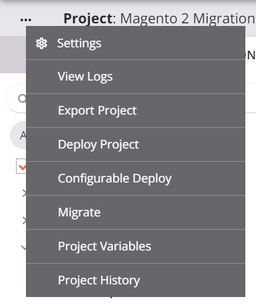
-
In the Deploy tab, disable HTTP Validation Rule:
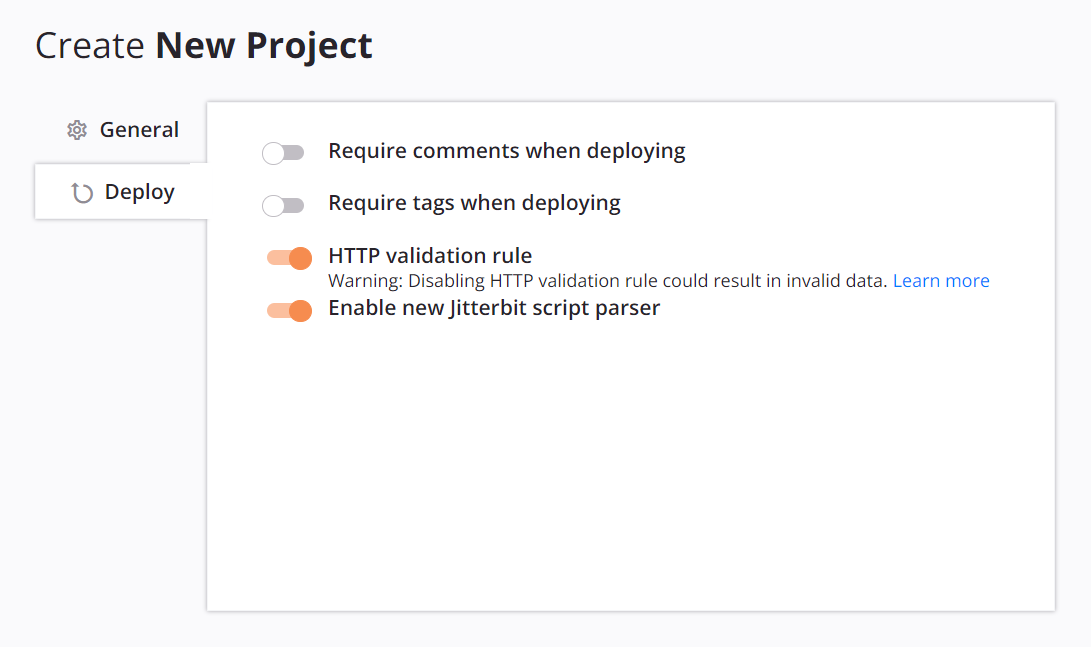
-
Click Save.
After you disable and save the setting, the operation validation errors from this rule should be resolved. However, any HTTP Target 1 activities used in a Two-target archive pattern operation write to the Target 2 activity of the last deployed operation. This behavior might cause invalid data to be written.
Caution
Disabling the HTTP validation rule isn't recommended and can result in unintentionally writing invalid data to target activities in operations that use the Two-target archive pattern.
Re-enable the HTTP validation rule
If you previously disabled the HTTP validation rule and want to re-enable it, complete the following steps:
-
Open the project settings.
-
In the Deploy tab, enable HTTP Validation Rule.
-
Click Save. This change is a design-time change and doesn't deploy any changes to the Harmony cloud.
-
Resolve any HTTP validation errors (see Resolve HTTP validation errors).
-
Redeploy the project (see Project deployment).
Note
Before redeployment, Harmony allows execution of any now-invalid operations because Harmony executes the currently deployed operations. Redeployment of the affected operations is required for the changes to propagate to Harmony.
Component names must be unique after project import
-
Symptom: After importing a project from a JSON export file, one or more components show as invalid and deployment fails with a message similar to:
[Operation / Connection / Activity / Transformation / Script / Tool / Email / Variable] names must be unique. -
Possible cause: The imported project contains multiple components of the same type with identical names. Studio prevents creating duplicate names when configuring components directly in the UI, but a full project import does not apply that check.
- Resolution:
- In the project pane, identify the invalid components, shown in red italics with an error icon.
- Click the error icon to view the specific duplicate name causing the conflict.
- Rename one of the duplicate components so each name is unique within its type.
- Redeploy the project after resolving all duplicate name errors.
- To bring only selected components into an existing project, use selective import, which flags conflicts with same-named components already in the target project and lets you replace them or keep both.
Private agent-only connector blocks import to a cloud agent environment
-
Symptom: Importing or migrating a project into an environment associated with a cloud agent group is blocked because the project uses a private agent-only connector. The message lists the private agent-only connectors responsible. A full project import displays:
The project you are importing uses private agent only connectors and cannot be imported into a cloud environment.A selective import displays a Component import not allowed dialog:
The components you are importing uses private agent only connectors and cannot be imported into a cloud environment. -
Possible cause: The project uses one or more connectors that are available only on private agents. The Agent availability column on the Connectors list shows which connectors are private agent-only. Cloud agents do not support these connectors, so Studio prevents the project from being imported or migrated into a cloud agent environment.
- Resolution:
- Import or migrate the project into an environment associated with a private agent group that has the required connector installed.
- If the project must run on cloud agents, replace the private agent-only connector activities with cloud-compatible connectors (such as HTTP v2 for REST APIs, or the Database connector with a cloud-accessible endpoint) before importing.
Uploading a schema file replaces it project-wide
- Symptom: After uploading a new schema file during transformation configuration, other transformations in the project that used the same schema now behave unexpectedly or produce errors.
- Possible cause: When you upload a file with the same name as an existing schema file already defined in the project, Studio prompts with an Overwrite file? dialog. If you click Continue, the existing file is replaced in every location where it is used. This replacement is project-wide, not scoped to the current transformation.
- Resolution:
- Before uploading a replacement schema file, confirm whether the existing schema is shared: open the schema for editing, and if it is referenced by more than one component, Studio displays a Schema used by multiple components dialog listing them (see Update transformation-defined schemas). Assess the impact across all listed components before proceeding.
- If only one transformation should use the updated schema, click Cancel at the Overwrite file? dialog (or rename the new file before uploading) so it does not overwrite the shared file.
Marketplace process template deployment fails due to schema mismatch
- Symptom: A project imported from a Marketplace process template fails to deploy or produces errors at runtime because fields are missing from a transformation or source and target activity validation fails.
- Possible cause: Process templates are developed against a specific endpoint instance. If your instance differs (for example, if your Salesforce or NetSuite org has different custom or standard fields), the schemas embedded in the template's transformations may not match your endpoint.
- Resolution:
- In the affected transformation, open the schema settings and click the refresh icon (or the word Refresh) to regenerate the schema from your connected endpoint.
- If the schema still does not match after refreshing, clear the existing schema and re-mirror it from a current sample file or directly from the endpoint.
- Remap any fields that were added or removed during schema regeneration.
- Redeploy the project and rerun the operation to confirm the issue is resolved.
Studio becomes slow or unresponsive with very large projects
- Symptom: Studio responds slowly when a single workflow contains a very large number of operations, or when saving a very large script.
- Possible cause: The design canvas renders all operations in the active workflow at once, so a workflow with a very large number of operations places high memory demands on the browser.
- Resolution:
- Break large workflows into smaller, linked sub-workflows. Studio renders only the active workflow canvas, so fewer operations per workflow improves responsiveness. Use operation actions to chain sub-workflows together.
- If slowness occurs specifically when saving a large script, split the script into smaller scripts and call them using
RunScript.
System and resource errors
Chunking requires a native connector as the source
- Symptom: An operation with chunking enabled sends all records to the target in a single batch instead of honoring the configured chunk size. Errors from the target indicate the batch limit was exceeded (for example, Salesforce returns
EXCEEDED_ID_LIMIT: record limit reached. cannot submit more than 200 records into this call). - Possible cause: Chunking is honored only when the source is a native connector. Operations using native sources such as HTTP, Database, Variable, and Local Storage honor chunking normally.
- Resolution:
- If chunking is not required, disable it in the operation options.
- If chunking is required, split the operation into two:
- In the first operation, read from the original source and write to a Variable Write activity.
- In the second operation, read from a Variable Read activity and write to the original target with chunking enabled. Because the Variable connector is native, chunking works correctly in this operation. For the chunking setup steps, see Configure operation chunking.
Variable updates lost in chunked multi-threaded operations
- Symptom: When an operation runs with chunking enabled and Max Number of Threads set to more than 1, global or project variable updates made during the operation are not fully preserved after it completes. One possible case is populating a dictionary or array variable from each source record and finding it holds only part of the data afterward (for example, roughly half of the records when two threads run). This can surface with connectors whose default configuration uses more than one thread, such as Salesforce activities, which default to 2 threads.
- Possible cause: Each thread receives its own copy of the global and project variables at the start of processing. Thread-local changes are not merged back into the shared state. Only changes made by the first thread are preserved when the operation completes; changes from all other threads are discarded.
- Resolution:
- If correctness matters more than per-operation throughput, set Max Number of Threads to
1. Each chunk then processes sequentially, so variable updates are not split across threads. - If multi-threaded throughput is required, do not accumulate per-record state in a global or project variable. Instead, stage each thread's output to a unique Temporary Storage file or a staging database table, then consolidate the results in a subsequent single-threaded operation. For a worked example of the staging pattern, see Variable scoping with chunking.
- More generally, do not rely on global or project variable updates from chunked, multi-threaded operations in later scripts or operations. If variable state must be preserved, set those variables in a non-chunked operation step that runs before or after the chunked transformation. For details on chunking behavior with variables, see Use variables with chunking.
- If correctness matters more than per-operation throughput, set Max Number of Threads to
Failed to create temporary directory
-
Symptom: An operation fails to create a temporary directory, with an error such as:
Failed to create the directory '/tmp/jitterbit/...'. Reason: boost::filesystem::create_directories: Permission deniedOn a cloud agent group, it may instead report
No space left on device. -
Possible causes:
- On a private agent, the Jitterbit Agent service account lacks OS-level permissions on the temporary files path, or the disk is full.
- On a cloud agent group, the cause is on the Jitterbit-managed agent side rather than in your project or configuration.
-
Resolution:
- For private agents, confirm the agent service account has sufficient permissions on the temporary files path (
/tmporTemporaryFiles), and verify the agent host has adequate free disk space. - For cloud agent groups, this indicates an agent-side issue that Jitterbit resolves. Contact Jitterbit support and include the error message and the time the failures occurred.
- For private agents, confirm the agent service account has sufficient permissions on the temporary files path (
Operation log messages truncated at approximately 100 KB
- Symptom: An operation log message appears cut off, ending with
message truncated. This can appear in the operation logs or when viewing an Operation log entry on the API Manager API Logs page. - Possible cause: Operation log messages that exceed approximately 100 KB (approximately 99,000 characters) are truncated. The truncation point is marked with
message truncatedat the end of the message. - Resolution: If you need the full log content, reduce the verbosity of the operation's logging or split the operation into smaller units that produce shorter log messages.
Operation debug logging exposes PII and credentials in plaintext
- Symptom: Sensitive data, credentials, or personally identifiable information (PII) appears in the Harmony cloud logs.
- Possible cause: When operation debug logging is enabled for an operation, all request and response data is stored in the Harmony cloud in clear text for 30 days.
- Resolution:
- Use operation debug logging only in controlled, non-production environments or for a limited diagnostic period.
- To disable component input and output data generation for a private agent group, set
verbose.logging.enable=falsein the[VerboseLogging]section of the agent configuration file.