Operation design troubleshooting in Jitterbit Studio
Introduction
This page provides guidance for resolving common issues that occur during the design phase of building integration projects in Integration Studio. For issues that occur during operation execution, see Operation troubleshooting.
Operation validation errors
Operations must be valid before you can deploy them. This section covers validation errors that can appear when operations don't conform to valid patterns. For information about validation patterns and how to build valid operations, see Valid operation patterns.
Common operation validation errors
Operations with validation errors display an invalid icon on the design canvas and in the project pane. Click the icon to view the specific error message.
The following table lists common validation errors and their resolutions:
| Error | Resolution |
|---|---|
| Operation is empty. | The operation must have at least one operation step. |
| Operation does not conform to any valid pattern. Operation rules and patterns can be found here. |
The operation must meet established operation patterns that the agent supports and expects. These patterns are covered under Validation patterns. |
| The transformation [source / target] schema does not match the schema structure provided by ["Activity Name"] activity. Open transformation ["Transformation Name"] in ["Operation Name"] operation and refresh the target schema. | In an operation that contains a transformation with an activity-provided schema, the activity-provided schema must match the schema structure provided by an adjacent activity. |
| Transformation ["Transformation Name"] has a source schema but no source activity. Remove the source schema from the transformation or add a source activity before the transformation. | If the operation contains a transformation with an activity-provided or transformation-provided source schema, there must be a source activity preceding the transformation. |
| HTTP target activities that send their response to a second target activity can only send responses to one target activity throughout the project. The HTTP activity ["Target 1 Activity Name"] in this operation is sending its response to multiple target activities throughout the project. In this operation its target is ["Target 2A Activity Name"]. In operation ["Operation 2"] its target is ["Target 2B Activity Name"]. Replace the ["Target 1 Activity Name"] activity with a duplicate activity in one of the operations. You can do this by finding the ["Target 1 Activity Name"] activity in the Components Tab, open the menu, and duplicate. Drag the duplicated activity to the operation. |
In an operation that uses the Two-target archive pattern and contains an HTTP target activity that writes a response to a second target activity, the HTTP target activity also being used in another Two-target Archive Pattern operation must write to the same target activity. Note: This validation rule can be disabled, though doing so is not recommended. For more information see HTTP validation rule errors below. |
| "Operation ["Operation Name"] cannot have more than one listener or event-based activity: ["Activity Names"]." | An operation can contain only one listening activity per operation. |
| "Operation ["Operation Name"] has ["Activity Name"] as a listener or event-based activity -- such activities needs to be the first in the operation. | The operation must meet established operation patterns for the listening activity. The operation patterns that each listening activity can be used with are listed in the documentation for each activity. |
| "Operation ["Operation Name"] cannot have ["On Success" / "On Fail" / "On SOAP Fault"] outcome to ["Operation Name 2"] target operation which is has a listener or event-based as first activity." | An operation cannot use operation actions to invoke another operation that contains a listening activity. |
| "Operation ["Operation Name"] starts with a listener or event-based activity ["Activity Name"] and cannot have schedule attached to." | An operation that contains a listening activity cannot be run on a schedule. |
| "["Script Name"] script in ["Operation Name"] operation cannot use RunOperation() to invoke ["Operation Name 2"] operation that has a listener or event-based activity. | An operation cannot use the RunOperation function to invoke another operation that contains a listening activity. |
HTTP validation rule errors
One of the HTTP validation rules applies to operations that use the Two-target archive pattern where an HTTP activity in the Target 1 position writes a response to a second target activity (Target 2). In this scenario, the validation rule requires that an HTTP Target 1 activity must not be used in any other Two-target archive pattern operations where the HTTP Target 1 activity writes to a different second target activity.
Operations that violate this validation rule appear as invalid with an error message similar to the following example:
Dialog text
Validation Errors
operationName
HTTP target activities that send their response to a second target activity can only send responses to one target activity throughout the project. The HTTP activity activityName in this operation is sending its response to multiple target activities throughout the project.
In this operation its target is targetName. In operation otherOperation its target is otherTarget.
Replace the activityName activity with a duplicate activity in one of the operations. You can do this by finding the activityName activity in the Components Tab, open the menu, and duplicate. Drag the duplicated activity to the operation.
Resolve HTTP validation errors
Follow the instructions in the error message to fix the operations so they're valid. To resolve these errors, complete the following steps:
-
Duplicate the HTTP target activity in the Target 1 position of one of the operations that uses the Two-target HTTP archive pattern.
-
Replace the HTTP target activity in the Target 1 position of the identified operations with the duplicate copy.
-
Repeat for any additional invalid operations. After you resolve the validation errors, redeploy the operations.
Disable the HTTP validation rule
In certain situations, you might want to disable this HTTP validation rule. To disable the rule, complete the following steps:
-
Open the project settings:
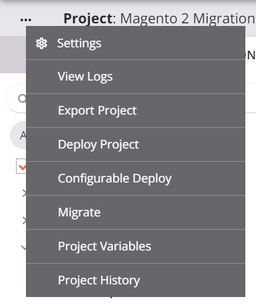
-
In the Deploy tab, disable HTTP Validation Rule:
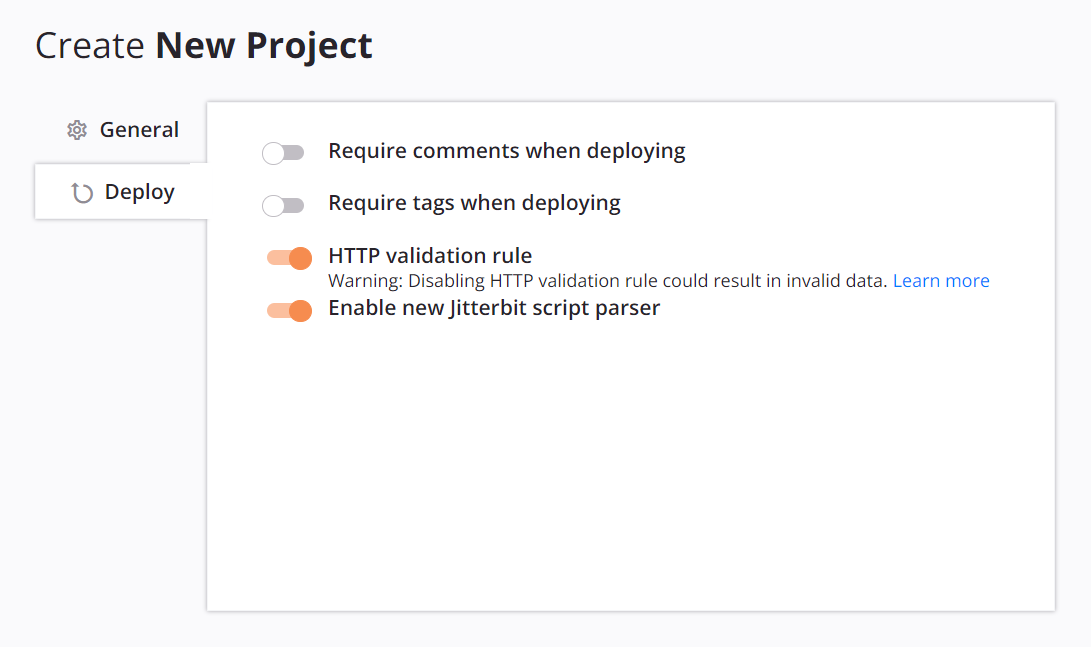
-
Click Save.
After you disable and save the setting, the operation validation errors from this rule should be resolved. However, any HTTP Target 1 activities used in a Two-target archive pattern operation write to the Target 2 activity of the last deployed operation. This behavior might cause invalid data to be written.
Caution
Disabling the HTTP validation rule isn't recommended and can result in unintentionally writing invalid data to target activities in operations that use the Two-target archive pattern.
Re-enable the HTTP validation rule
If you previously disabled the HTTP validation rule and want to re-enable it, complete the following steps:
-
Open the project settings.
-
In the Deploy tab, enable HTTP Validation Rule.
-
Click Save. This change is a design-time change and doesn't deploy any changes to the Harmony cloud.
-
Resolve any HTTP validation errors (see Resolve HTTP validation errors).
-
Redeploy the project (see Project deployment).
Note
Before redeployment, Harmony allows execution of any now-invalid operations because Harmony executes the currently deployed operations. Redeployment of the affected operations is required for the changes to propagate to Harmony.