Support SOAP MTOM/XOP messages using Jitterbit Studio
Introduction
This design pattern sets up SOAP service Message Transmission Optimization Mechanism (MTOM) with XML-binary Optimized Packaging (XOP) support using the HTTP connector.
Important
The SOAP connector does not support this functionality. The HTTP connector is used as a workaround.
Design pattern and example
This example operation chain is used to illustrate the design pattern, whose key characteristics are described below:
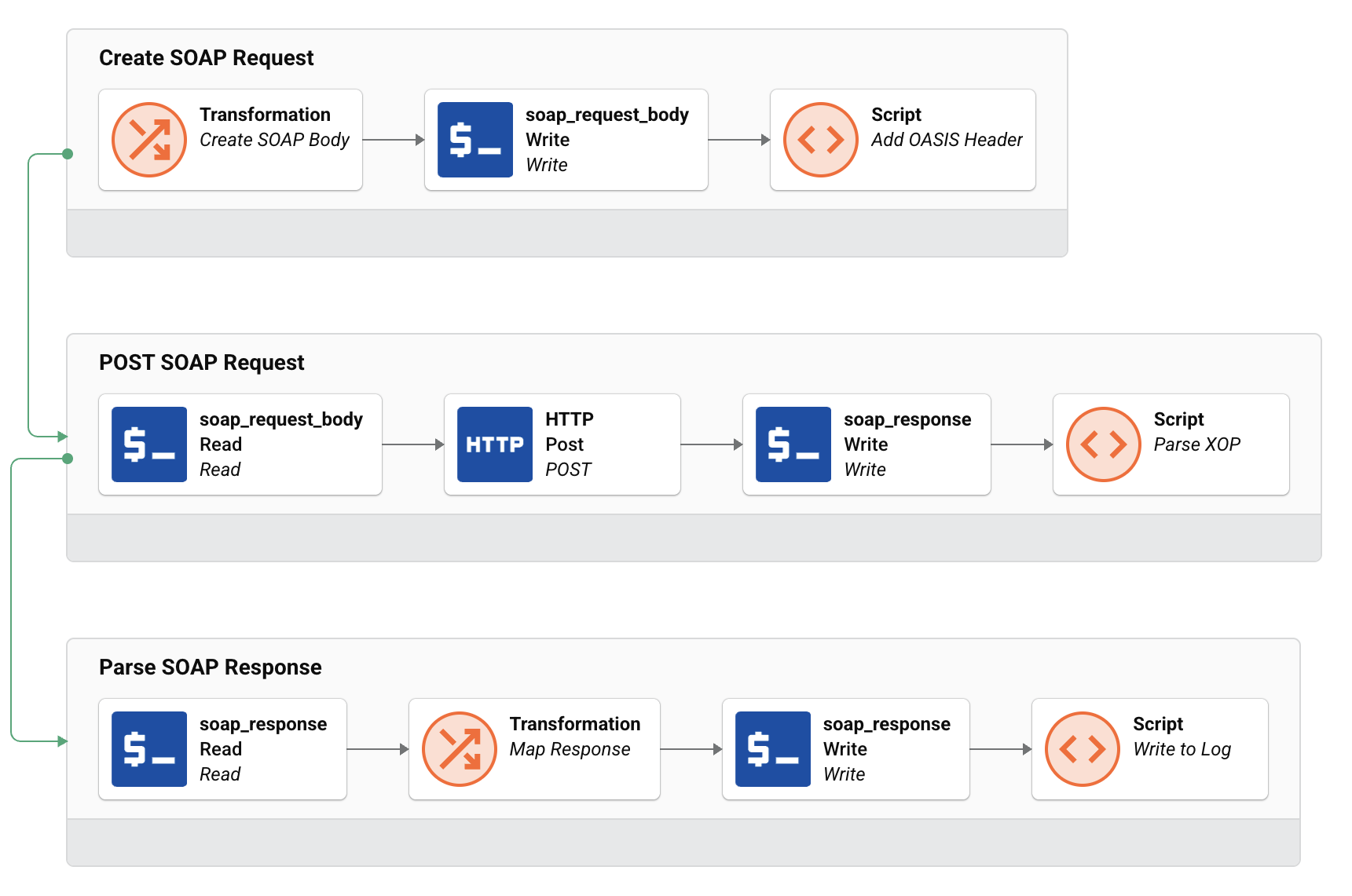
-
(Optional) The Create SOAP Request operation applies SOAP request headers (such as an OASIS WSS header) as necessary upstream of the request operation with a script:
Example OASIS WSS header addition script:<trans> WriteToOperationLog('Pre: ' + $soap_request_body); $soap_request_body=Replace($soap_request_body, '<?xml version="1.0" encoding="UTF-8"?>',''); $soap_request_body=Replace($soap_request_body, '<root xmlns="http://www.jitterbit.com/XsdFromWsdl" xmlns:ns="http://schemas.example.com/2025/1/Test/Batch" xmlns:xsi="http://www.w3.org/2001/XMLSchema-instance">', ''); $soap_request_body=Replace($soap_request_body,'<transaction>',''); $soap_request_body=Replace($soap_request_body,'<body>',''); $soap_request_body=Replace($soap_request_body,'</transaction>',''); $soap_request_body=Replace($soap_request_body,'</body>',''); $soap_request_body=Replace($soap_request_body,'</root>',''); $soap_request_body=trim($soap_request_body); $soap_request_body='<?xml version="1.0" encoding="UTF-8" standalone="no"?> <soapenv:Envelope xmlns:soapenv="http://schemas.xmlsoap.org/soap/envelope/" xmlns:ns="http://schemas.example.com/2025/1/Test/Batch" xmlns:xsi="http://www.w3.org/2001/XMLSchema-instance"> <soapenv:Header> <wsse:Security xmlns:wsse="http://docs.oasis-open.org/wss/2004/01/oasis-200401-wss-wssecurity-secext-1.0.xsd" soapenv:mustUnderstand="1"> <wsse:UsernameToken xmlns:wsu="http://docs.oasis-open.org/wss/2004/01/oasis-200401-wss-wssecurity-utility-1.0.xsd" wsu:Id='+ $wss.id +'> <wsse:Username>'+ $WSS.User +'</wsse:Username> <wsse:Password Type="http://docs.oasis-open.org/wss/2004/01/oasis-200401-wss-username-token-profile-1.0#PasswordText">'+ $WSS.Password +'</wsse:Password> </wsse:UsernameToken> </wsse:Security> </soapenv:Header> <soapenv:Body> ' + $soap_request_body; $soap_request_body = $soap_request_body + '\r\n</soapenv:Body> </soapenv:Envelope>'; WriteToOperationLog('Post: ' + $soap_request_body); </trans>If these headers aren't required, the SOAP request body can be defined and used in the POST SOAP Request directly.
-
The POST SOAP Request operation performs the actual SOAP request and XOP parsing. It requires the following:
- A configured HTTP connection. The connection's base URL should point to the desired SOAP service. For example,
http://schemas.example.com/service.svc. No other fields are required. -
An HTTP POST activity. It should contain two request headers:
Content-Type:text/xml; charset="utf-8"SOAPAction:"http://schemas.example.com/service/action"
-
Request and response variables to work with your payloads (
soap_request_bodyandsoap_response). -
A script that splits the response XOP payload for parsing as necessary:
Example XOP parsing script:<trans> parseDelim=Split(trim($soap_response),"\n"); arrayDelim=parseDelim[1]; splitArray=Split($soap_response,arrayDelim); splitArray=split(splitArray[1],"\n"); xml=splitArray[4]; splitXml=split(xml,'<s:Body>'); Xml=split(splitXml[1],'</s:Body>')[0]; start='<?xml version="1.0" encoding="UTF-8"?> <root xmlns="http://www.jitterbit.com/XsdFromWsdl" xmlns:ns="http://schemas.example.com/2025/1/Test/Batch" xmlns:xsi="http://www.w3.org/2001/XMLSchema-instance"> <transaction> <response> <body>'; end='</body></response></transaction></root>'; $soap_response =start+xml+end; WriteToOperationLog($soap_response); </trans>Important
The
Splitfunction calls in the above example may not apply to your use case. Apply parsing rules based on the web service you are calling.Tip
To determine the correct array indices for your service, add
WriteToOperationLog($soap_response)to the script temporarily and run the operation. The raw MTOM response appears in the operation log, showing the exact boundary delimiter and part structure. Count the lines and parts to identify the correct index values forsplitArrayandsplitXml.
- A configured HTTP connection. The connection's base URL should point to the desired SOAP service. For example,
-
The Parse SOAP Response operation transforms the response XOP to further support your use case.
For general guidance on making HTTP requests in Studio, see Call a REST API using the HTTP v2 connector.