Jitterbit App Builder connector in Jitterbit Studio
Summary
The Jitterbit App Builder connector establishes access to a Jitterbit App Builder application published as a REST API.
The Jitterbit App Builder connector provides an interface for creating a Jitterbit App Builder connection, the foundation used for generating instances of Jitterbit App Builder activities. These activities, once configured, interact with the Jitterbit App Builder application through the connection.
The Jitterbit App Builder connector is accessed from the design component palette's Project endpoints and connectors tab (see Design component palette).
Connector overview
This connector is used to first configure a Jitterbit App Builder connection. Activity types associated with that connection are then used to create instances of activities that are intended to be used as sources (to provide data in an operation) or targets (to consume data in an operation).
Together, a specific Jitterbit App Builder connection and its activities are referred to as a Jitterbit App Builder endpoint:
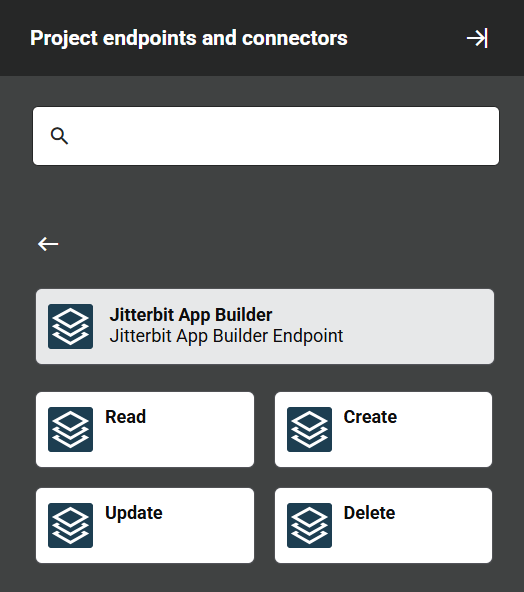
-
Read: Retrieves one or more items from an object in the Jitterbit App Builder application and is intended to be used as a source in an operation.
-
Create: Creates a new item for an object in the Jitterbit App Builder application and is intended to be used as a target in an operation.
-
Update: Updates an existing item for an object in the Jitterbit App Builder application and is intended to be used as a target in an operation.
-
Delete: Deletes an existing item for an object in the Jitterbit App Builder application and is intended to be used as a target in an operation.
Endpoints created with this connector are excluded from endpoint usage reporting and from your license count.
Prerequisites and supported API versions
The following prerequisites apply to the Jitterbit App Builder connector:
-
In your Jitterbit App Builder application, publish the app as a REST API endpoint and publish an OpenAPI (Swagger) document for that REST API. The Jitterbit App Builder connector uses this document to discover the application's available objects and operations.
Note
An object or operation that is excluded from the published documentation does not appear in the connector's object and operation selection tables.
-
Configure authentication on the Jitterbit App Builder application's REST API that matches the connection's Authentication option, and gather the credentials it requires. For example, for the API Key option, configure API key authentication and generate an API key. See Jitterbit App Builder connection for the available options.
-
If the application's data source uses roles-based authorization, the App Builder user that the connection authenticates as must belong to a group with a role that grants the permission each activity needs on the objects it uses. That user is the owner of the credentials in the connection's authentication settings:
Activity Required permission Read Read Create Insert Update Update Delete Delete
This connector can be used with cloud agents and private agents.
Agents automatically download the latest version of this connector when required. On private agents, you can suspend these updates with the Disable Auto Connector Update organization policy.
Troubleshooting
If you experience issues with the Jitterbit App Builder connector, these troubleshooting steps are recommended:
-
Click the Test button in the connection configuration to ensure the connection is successful and to ensure the latest version of the connector is downloaded to the agent (unless using the Disable Auto Connector Update organization policy). See the note under Test in Jitterbit App Builder connection for a case where a failed test doesn't necessarily mean the credentials are incorrect.
-
If an activity fails for an object that the connection can otherwise access, check that the App Builder user the connection authenticates as has the role permission that the activity requires on that object.
-
Check the operation logs for any information written during execution of the operation.
-
Enable operation debug logging (for cloud agents or for private agents) to generate additional log files and data.
-
If using private agents, you can enable connector verbose logging for this connector by adding this logger configuration entry to your private agent's
logback.xmlfile:<logger name="org.jitterbit.connector.appbuilder" level="DEBUG"/>For more information on connector verbose logging, see Verbose logging for connectors using Jitterbit private agents.
-
If using private agents, you can check the agent logs for more information.
-
For additional troubleshooting considerations, see Operation troubleshooting.