EDI EDIFACT settings in Jitterbit EDI
Introduction
To configure the EDI settings for an EDIFACT workflow, enter values in the following tabs:
Tip
If you change any values on this page, click the Save button.
Preferred ID
Use this tab to set which EDI ID (GS ID) to use with each partner:

-
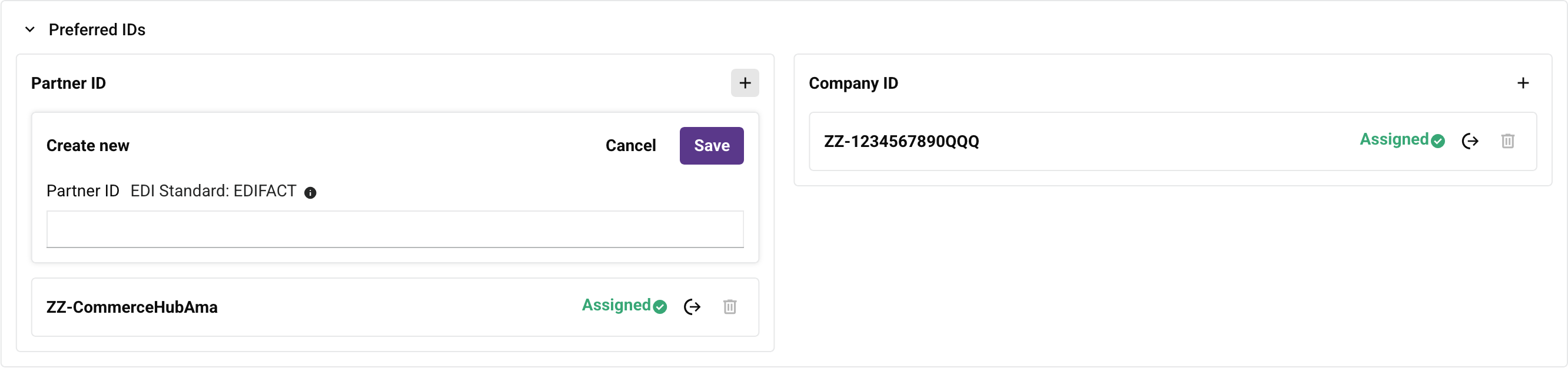
Partner ID: This panel shows the available partner IDs. You can do the following:
-
Create: Click to open a Create new row. Enter the new partner ID, then click the Save button:
-
Assign: Click to assign the ID to the partner.
-
Delete: Click to delete the ID. To confirm the action, enter the word DELETE in the Delete dialog's text field, then click the Delete button. (You cannot delete assigned IDs, or the initial ID assigned to the partner.)
-
-
EDI ID: This panel shows the available EDI IDs. You can do the following:
-
Create: Click to open a Create new row. Enter the new EDI ID, then click the Save button.
-
Assign: Click to assign the ID to your organization.
-
Delete: Click to delete the ID. To confirm the action, enter the word DELETE in the Delete dialog's text field, then click the Delete button. (You cannot delete assigned IDs, or the initial EDI ID created for the company.)
-
Interchange
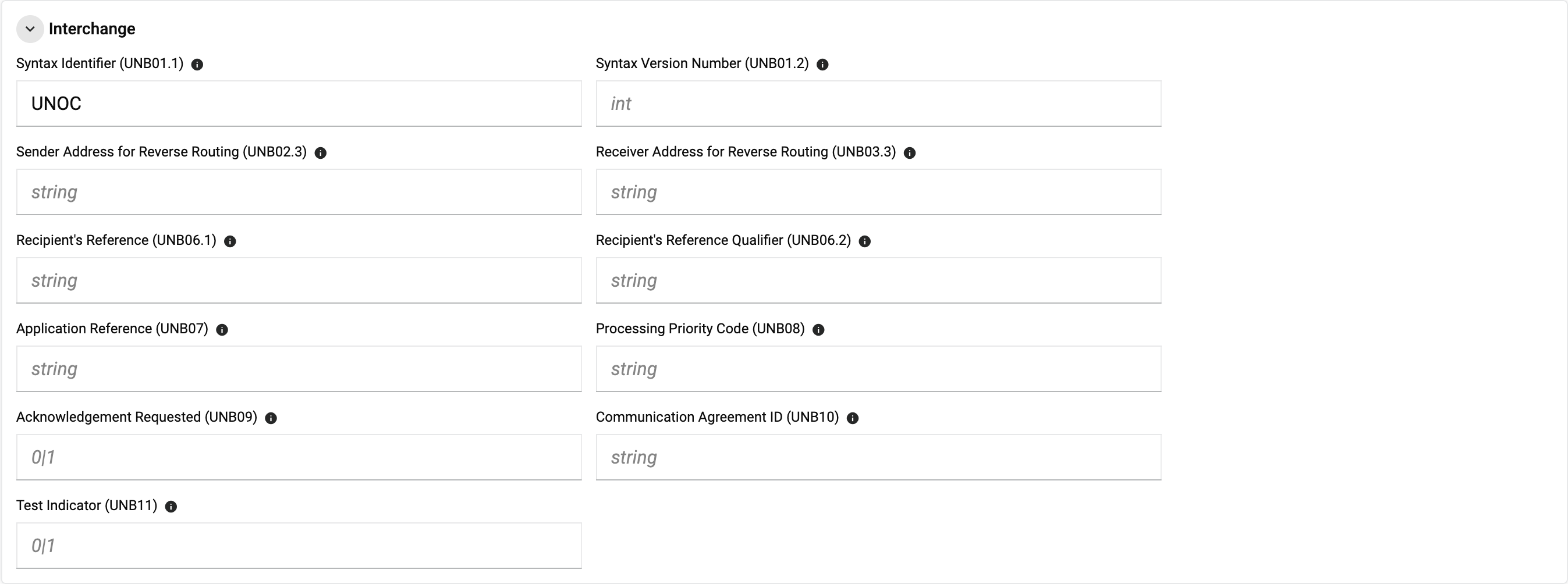
For a full example EDIFACT message showing these elements in context, see the EDIFACT example in the EDI envelopes reference.
-
Syntax Identifier (UNB01.1): Address for reverse routing. For example,
UNOC.Common values include:
UNOA: UN/ECE level A (the default character set, with a restricted alphabet).UNOB: UN/ECE level B (alternative graphic character allocations).UNOC: Latin alphabet No. 1 (ISO 8859-1, supports Western European languages).UNOD: Latin alphabet No. 2 (ISO 8859-2, Central/Eastern European languages).UNOE: Latin or Cyrillic alphabet.UNOF: Latin or Greek alphabet.UNOX: Code extension technique via ISO 2022/ISO 2375.UNOY: ISO 10646-1 (Unicode/UTF-8 octet without code extension).
-
Syntax Version Number (UNB01.2): Version of address for reverse routing. For example,
3.Common values are
1,2,3, and4, corresponding to successive revisions of the ISO 9735 syntax. Version4also supports 8-digit dates. -
Sender Address for Reverse Routing (UNB02.3): Unique reference assigned by the sender. This is typically left blank unless a complex, multi-tiered network setup or a specific sub-routing protocol requires explicit reverse-routing data.
-
Receiver Address for Reverse Routing (UNB03.3): Identifies a particular application or business process that is relevant to the interchange. Its exact format and usage are typically determined by mutual agreement between trading partners.
-
Recipient's Reference (UNB06.1): Specifies optional message identification when the interchange is restricted to a single message type. This is the primary component (data element
0022) of theS005composite in theUNBsegment, and holds the recipient's reference or password value. For example, within a fullUNBsegment it might appear asUNB+...+:MYPASSWD123:.... -
Recipient's Reference Qualifier (UNB06.2): Code indicating how the recipient identifies or categorizes the message. This is data element
0025in theS005composite, and uses a two-character code. Common values include:AA: Reference.BB: Password.
-
Application Reference (UNB07): Identifies the target application or system on the recipient's side. This is data element
0026, a 1–14 character alphanumeric field. For example,INVOICdirects the data to the invoice application module on the receiver's system. -
Processing Priority Code (UNB08): A single, optional alphanumeric character used when the sender requests a specific processing priority from the receiver. For example,
Arequests priority handling. -
Acknowledgment Requested (UNB09): Indicates whether the sender wants a functional acknowledgment (such as a
CONTRLmessage) confirming the interchange arrived safely. A value of1requests an acknowledgment; an empty or omitted value means none is requested. -
Communication Agreement ID (UNB10): An optional 1–35 character field specifying the protocol, custom rule, or partner agreement controlling the data exchange.
-
Test Indicator (UNB11): Set to 1 if the interchange is a test. When included, a value of
1indicates a test transmission; when omitted, the interchange is treated as production data.
Functional Group

-
Association Assigned Code (UNG07.3): A code assigned by the association responsible for the design and maintenance of the type of message concerned.
-
Application Password (UNG08): Password to recipient's division, department or sectional system (if required).
Separators
-
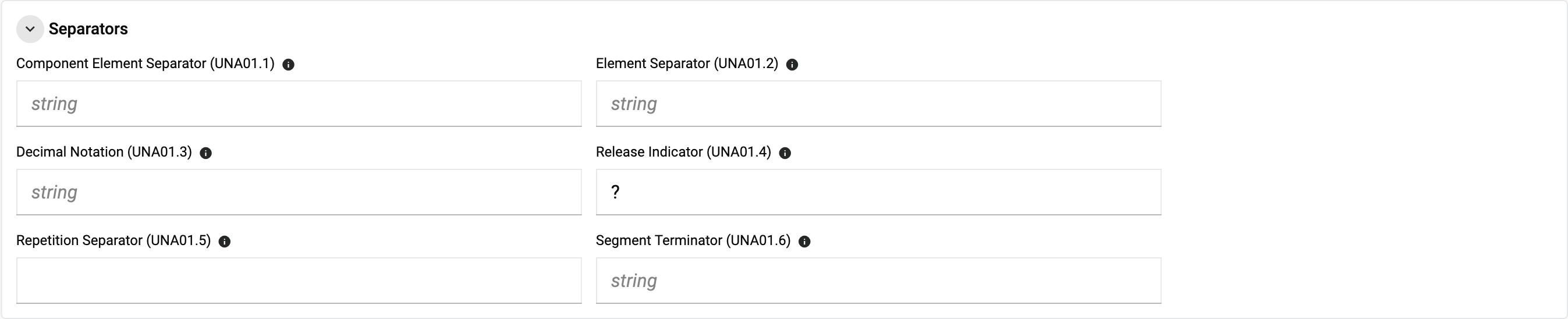
Component Element Separator (UNA01.1): Specifies the character used to separate components within data elements. For example,
:. Other characters are sometimes used instead, such as-,!, or/. -
Element Separator (UNA01.2): Specifies the character used to separate individual data elements within a segment. For example,
+, the default and most widely used separator in EDIFACT. Other characters are sometimes used instead (for example,:,|, or;) when the default conflicts with literal data in the payload. -
Decimal Notation (UNA01.3): Specifies the character used for decimal notation. For example,
.is the standard default (as in123.45);,is used in some European contexts where a comma serves as the decimal separator (as in123,45). -
Release Indicator (UNA01.4): Specifies the character used to indicate that the next character is to be treated as a literal rather than a separator or delimiter. For example,
?is the standard default. If?already appears in the payload text, an alternative such as!,#, or&can be used instead. -
Repetition Separator (UNA01.5): Specifies the character used to separate repeated occurrences of a data element. This element is reserved in some EDIFACT syntax versions and isn't used by Jitterbit EDI. Where the EDIFACT standard does use this position (syntax version 4),
*is the typical default, with^,!, or~used as alternatives. -
Segment Terminator (UNA01.6): The character that indicates the end of a segment in the document. For example,
'.
Control Number

- Control Number: The number used in the header of an EDI document to validate exchanged documents.