Default values in Jitterbit App Builder
A default value is a fallback value configured on a column in the data layer: if a user doesn't enter a value for that column when creating a new record, the database populates it with the fallback value instead. This is useful when most records are expected to share the same value for a column, with few or no exceptions.
A fallback value can be either:
-
A literal value, such as
truefor an Is Active column. This is populated on the New event, so it's visible in the UI as soon as the record is created, before it's saved. -
A database function supported by the underlying database, such as SQL Server's
newid()orgetdate(). The database only evaluates the function when the record is actually saved, so its value isn't visible in the UI until then.
For a Default rule that can look up or calculate a value with SQL logic instead of relying on the database, see Target a table or a business object on the Default rules page.
For an example walkthrough of configuring a default value, see Default values in Appendix A of the Introduction to App Builder tutorial series.
Set a default value
To demonstrate how to set a default value, we'll default the Country column on an Employee table to United States:
-
In App Workbench > Tables, locate and select the table containing the column.
-
In the Columns tab, find the column and click the edit icon at the end of its row.
-
In the Advanced section, enter
United Statesin the Default Value field: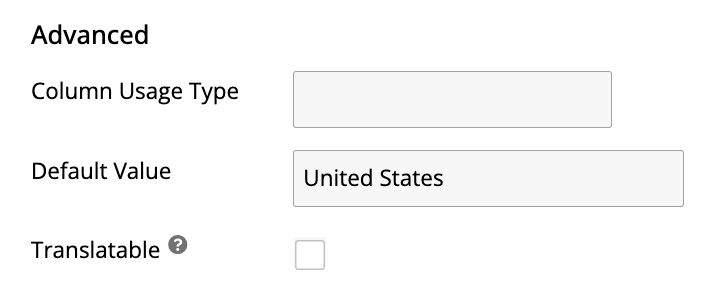
This field also accepts a database function instead of a literal value, such as
getdate()to default a date column to the current date and time. -
Click Save.
Refresh the app and create a new record on that table to confirm the fallback value appears (for a database function, save the record first, since its value isn't populated until save). Unless you also make the corresponding control read-only, users can still enter their own value in the UI before saving, which overrides the fallback. Applying a read-only control together with the fallback value is the most direct way to fully enforce a shared value. Alternatively, you can create an update rule that always runs on save and resets the column to a hardcoded value, though this approach is less efficient.