Configure SMTP in Jitterbit App Builder
Overview
To send emails from an App Builder app, you must first configure the SMTP settings.
Simple Mail Transfer Protocol (SMTP) is the standard protocol for sending emails across the internet. App Builder natively supports SMTP. Scenarios where App Builder sends emails include workflow notifications or those sent by the password reset feature. To send emails from App Builder, you must first configure SMTP settings.
SMTP configuration table
The SMTP server is registered as a notification server. App Builder ships with a single SMTP notification server which administrators must configure to enable SMTP operations.
| Property | Value |
|---|---|
| URI | smtp://mail.example.com:PORTNote Although optional, a |
| UserName | A username. |
| Password | A password. |
| From Address | A valid email address that is allowed to send mail via the given host. |
Configure SMTP in App Builder
To configure the URI and the default From Address values, follow these steps:
-
Navigate to the IDE.
-
From the Connect options, click the Notification Servers button.
-
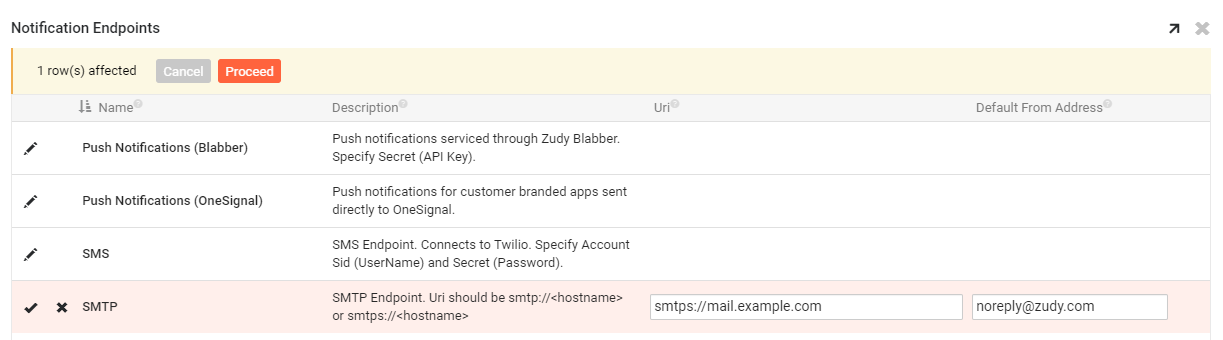
For the SMTP entry, double-click the row or click the Open record icon. A Notification Server popup opens:
-
Set the following values:
-
From Address: This must be a valid address via the given host. If a notification rule doesn't specify a From address, the one entered in this field will be used.
-
URI: The format of this value is critical, and should either be
smtp://<hostname>orsmtps://<hostname>. See the list of supported protocols. If sending email from a server hosted in the AWS US-East-1 region, for instance, you will entersmtps://email-smtp.us-east-1.amazonaws.com.
-
-
(Optional) Expand the Security section, then set the following values:
-
User Name: Enter the notification service account user name.
-
Password: Enter the password for the account.
-
Provider: (Since App Builder 4.57.) Select an OAuth, OpenID Connect, or SMTP client security provider.
-
-
(Optional) Expand the Testing section, set values for From and To, then click Test Email.
-
Close the popup.
Supported protocols
| Protocol | Definition |
|---|---|
| SMTP | Simple Mail Transfer Protocol (SMTP) is an Internet standard for electronic mail transmission. Standard ports: 25, 587, 465 |
| SMTPS | Simple Mail Transfer Protocol Secure (SMTPS) is a depreciated method for securing SMTP connections with Transport Layer Security (TLS). |
Important
App Builder does not support OAuth 2.0 for SMTP server authentication.
Troubleshooting
Error: "Argument passed in is not serializable. Parameter name: value"
This error may indicate App Builder is not able to authenticate the SMTP settings, and in particular the default From Address. Check the From Address property for the notification server, and ensure it is using a valid email address for the given host.
Error: "Value cannot be null. ParameterName: From Address"
This error may indicate App Builder is not able to authenticate the SMTP settings, and in particular the default From Address. Check the From Address property for the notification server, and ensure it is using a valid email address for the given host, and not null or empty.
Error: "Unknown URI scheme. Parameter name: uri"
This error may indicate App Builder is not able to authenticate the SMTP settings, and in particular the Uri value. Check the Uri property for the notification server, and ensure it is using a valid Uri value.
Error: "Authentication required"
This error may indicate App Builder is not able to authenticate the SMTP settings, and in particular either the UserName or Password property related to the SMTP configuration. Check that the notification server settings have the correct values set for both UserName and Password.